重要
翻訳は あなたが参加できる コミュニティの取り組みです。このページは現在 100.00% 翻訳されています。
18.13. HTML出力
注釈
このレッスンでは、QGISは、テキスト出力とグラフを生成するために使用されているHTML形式の出力を、どのように処理するかを学びます。
これまで作成した出力はすべて(ラスタまたはベクタ)レイヤでした。しかし、いくつかのアルゴリズムは、テキストとグラフィックスの形式で出力を生成します。このすべての出力はHTMLファイルに包まれいわゆる 結果ビューア で表示されます。これはプロセシングフレームワークの別の要素です。
どのように機能するかを理解するため、これらのアルゴリズムの1つを見てみましょう。
このレッスンで使用するデータでプロジェクトを開き、それから 属性の基本統計量 アルゴリズムを開きます。
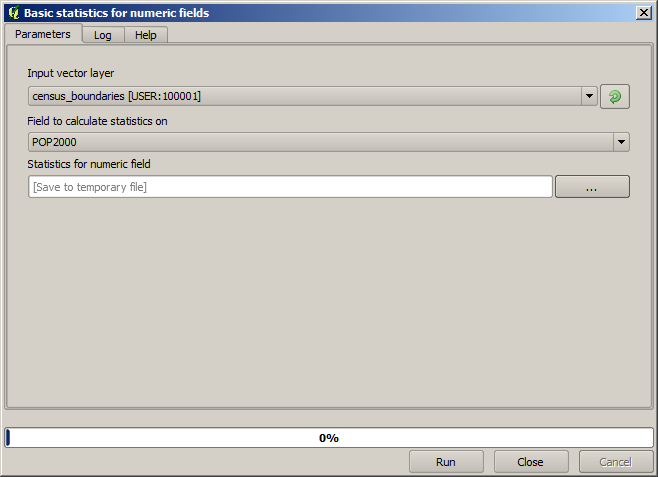
アルゴリズムはかなり単純で、使用するレイヤとそのフィールド(数値フィールド)の1つを選択する必要があるだけです。出力のタイプはHTMLですが、対応するボックスはラスタ又はベクタ出力のときに見つけられるものとまったく同じように動作します。ファイルパスを入力できますし、空のままにして一時ファイルに保存することもできます。この場合はしかし、 html と htm 拡張子だけが許可されているので、別の拡張子を使用して出力形式を変更する方法はありません。
プロジェクト内の唯一のレイヤと POP2000 フィールドを入力として選択してアルゴリズムを実行します。アルゴリズムが実行されパラメータダイアログが閉じられると次の図のような新しいダイアログが表示されます。
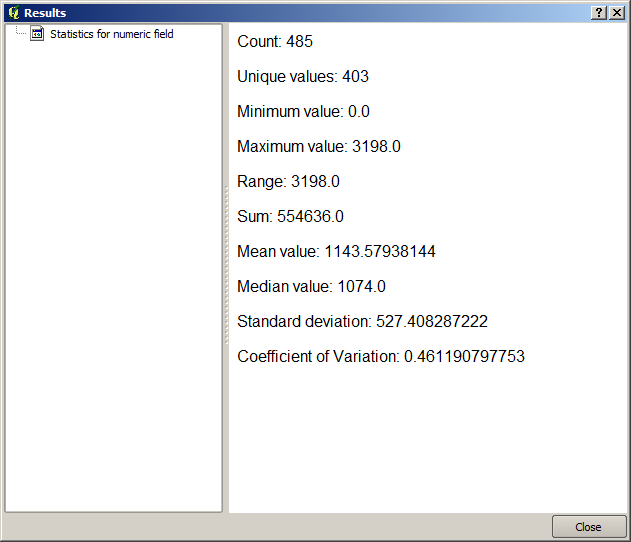
これは 結果ビューア です。これは、現在のセッション中に生成されたすべてのHTML結果を保持し、簡単にアクセスできますので、必要な時はいつでもすぐに確認できます。それはレイヤで発生するので、一時ファイルに出力を保存した場合はQGISを閉じると削除されます。非一時的なパスに保存した場合、ファイルは残りますが、それは次回QGISを開くとき 結果ビューア には表示されません。
いくつかのアルゴリズムは、他のより詳細な出力に分けることができないテキストを生成します。例えば、アルゴリズムで外部プロセスからのテキスト出力を取り込む場合がそうです。他の場合には、出力はテキストとして提示されますが、内部的には通常は数値の形で、いくつかの小さな出力に分割されます。私たちが実行したアルゴリズムはそのうちの一つです。これらの値の各々は、単一の出力として扱われ、変数に格納されます。これは今はまったく重要性を持ちませんが、モデルデザイナーに移ったときに、これらの値が他のアルゴリズムの数値入力として使用できるようになっていることがわかるでしょう。