Important
翻译是一项社区工作 you can join。此页面目前翻译进度为 88.33%。
16.5. 课程:几何构造
在本节中,我们将更深入地探讨如何在 SQL 中构造简单几何图形。实际上,您可能会使用 QGIS 等 GIS 软件,通过其数字化工具创建复杂几何图形;然而,了解其构造方式有助于编写查询语句,并理解数据库是如何组织的。
The goal of this lesson: To better understand how to create spatial entities directly in PostgreSQL.
16.5.1. 创建线(Linestrings)
Going back to our address database, let's get our streets table matching
the others; i.e., having a constraint on the geometry, an index and an entry in
the geometry_columns table.
16.5.2. 自己试试:★★☆(中等难度)
Modify the
streetstable so that it has a geometry column of type ST_LineString.别忘了同步更新 geometry_columns 表!
同时添加一个约束,防止插入非 LINESTRING 或非空的几何对象。
在新的几何列上创建空间索引
答案
alter table streets add column geom geometry;
alter table streets add constraint streets_geom_point_chk check
     (st_geometrytype(geom) = 'ST_LineString'::text OR geom IS NULL);
insert into geometry_columns values ('','public','streets','geom',2,4326,
     'LINESTRING');
create index streets_geo_idx
  on streets
  using gist
  (geom);
现在我们在 streets 表中插入一条线。此处我们将更新一条已有的街道记录:
update streets
set geom = 'SRID=4326;LINESTRING(20 -33, 21 -34, 24 -33)'
where streets.id=2;
在 QGIS 中查看结果。(您可能需要在“图层”面板中右键单击 streets 图层,然后选择“缩放到图层范围”。)
现在再创建一些街道记录——部分通过 QGIS,部分通过命令行。
16.5.3. 创建多边形
创建多边形同样简单。需注意:根据定义,多边形至少有四个顶点,且首尾顶点必须重合:
insert into cities (name, geom)
values ('Tokyo', 'SRID=4326;POLYGON((10 -10, 5 -32, 30 -27, 10 -10))');
Note
多边形的坐标列表需使用双层括号;这是为了支持包含多个不相连区域的复杂多边形。例如
insert into cities (name, geom)
values ('Tokyo Outer Wards',
        'SRID=4326;POLYGON((20 10, 20 20, 35 20, 20 10),
                           (-10 -30, -5 0, -15 -15, -10 -30))'
        );
如果您执行了此步骤,可通过将 cities 数据集加载到 QGIS、打开其属性表并选择新条目来验证结果。注意,这两个新多边形将表现为一个整体。
16.5.4. 练习:将城市与人员关联
本练习请完成以下操作:
清空 people 表中的所有数据。
在 people 表中添加一个外键列,引用 cities 表的主键。
使用 QGIS 采集若干城市。
使用 SQL 插入若干新的人员记录,确保每条记录都关联一条街道和一个城市。
更新后的 people 表结构应类似如下:
\d people

Table "public.people"
   Column   |         Type          |                      Modifiers
 -----------+-----------------------+--------------------------------------------
  id        | integer               | not null
            |                       | default nextval('people_id_seq'::regclass)
  name      | character varying(50) |
  house_no  | integer               | not null
  street_id | integer               | not null
  phone_no  | character varying     |
  geom      | geometry              |
  city_id   | integer               | not null
Indexes:
  "people_pkey" PRIMARY KEY, btree (id)
  "people_name_idx" btree (name)
Check constraints:
  "people_geom_point_chk" CHECK (st_geometrytype(geom) =
                       'ST_Point'::text OR geom IS NULL)
Foreign-key constraints:
  "people_city_id_fkey" FOREIGN KEY (city_id) REFERENCES cities(id)
  "people_street_id_fkey" FOREIGN KEY (street_id) REFERENCES streets(id)
答案
delete from people;
alter table people add column city_id int not null references cities(id);
(在 QGIS 中采集城市)
insert into people (name,house_no, street_id, phone_no, city_id, geom)
   values ('Faulty Towers',
           34,
           3,
           '072 812 31 28',
           1,
           'SRID=4326;POINT(13 -15)');

insert into people (name,house_no, street_id, phone_no, city_id, geom)
   values ('IP Knightly',
           32,
           1,
           '071 812 31 28',
           1,
           'SRID=4326;POINT(18 -24)');

insert into people (name,house_no, street_id, phone_no, city_id, geom)
   values ('Rusty Bedsprings',
           39,
           1,
           '071 822 31 28',
           1,
           'SRID=4326;POINT(22 -25)');
如果您收到以下错误信息:
ERROR:  insert or update on table "people" violates foreign key constraint
        "people_city_id_fkey"
DETAIL: Key (city_id)=(1) is not present in table "cities".
then it means that while experimenting with creating polygons for the
cities table, you must have deleted some of them and started over. Just
check the entries in your cities table and use any id which exists.
16.5.5. 查看我们的数据库结构
目前我们的数据库结构应如下所示:
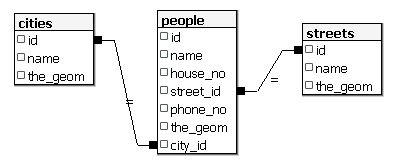
16.5.6. 自己试试:★★★(高级难度)
通过计算某城市所有地址点的最小凸包(convex hull),并对其外围创建缓冲区,生成该城市的边界。
答案
在“Tokyo Outer Wards”城市中添加若干人员
INSERT INTO people (name, house_no, street_id, phone_no, city_id, geom)
   VALUES ('Bad Aboum',
           57,
           2,
           '073 712 31 21',
           2,
           'SRID=4326;POINT(22 18)');

INSERT INTO people (name, house_no, street_id, phone_no, city_id, geom)
   VALUES ('Pat Atra',
           59,
           2,
           '074 712 31 25',
           2,
           'SRID=4326;POINT(23 14)');

INSERT INTO people (name, house_no, street_id, phone_no, city_id, geom)
   VALUES ('Kat Herin',
           65,
           2,
           '074 722 31 28',
           2,
           'SRID=4326;POINT(29 18)');
创建 myPolygonTable 表
CREATE TABLE myPolygonTable (
  id serial NOT NULL PRIMARY KEY,
  city_id int NOT NULL REFERENCES cities(id),
  geom geometry NOT NULL
);

ALTER TABLE myPolygonTable
  ADD CONSTRAINT myPolygonTable_geom_polygon_chk
  CHECK (st_geometrytype(geom) = 'ST_Polygon'::text );
创建并加载凸包
INSERT INTO myPolygonTable (city_id, geom)
  SELECT * FROM
  (
    SELECT
      ROW_NUMBER() over (order by city_id)::integer AS city_id,
      ST_CONVEXHULL(ST_COLLECT(geom)) AS geom
        FROM people
        GROUP BY city_id
  ) convexHulls;
16.5.7. 访问子对象
With the SFS-Model functions, you have a wide variety of options to access
sub-objects of SFS Geometries. When you want to select the first vertex point of
every polygon geometry in the table myPolygonTable, you have to do this in this
way:
将多边形边界转换为线串:
select st_boundary(geom) from myPolygonTable;
选择所得线串的第一个顶点:
select st_startpoint(myGeometry)
from (
    select st_boundary(geom) as myGeometry
    from myPolygonTable) as foo;
16.5.8. 数据处理
PostGIS 支持所有符合 OGC SFS/MM 标准的函数,这些函数均以 ST_ 开头。
16.5.9. 裁剪
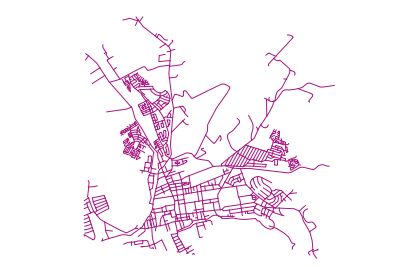
要裁剪数据的某一部分,可使用 ST_INTERSECTION() 函数。为避免生成空几何,可使用以下方式:
where not st_isempty(st_intersection(a.geom, b.geom))
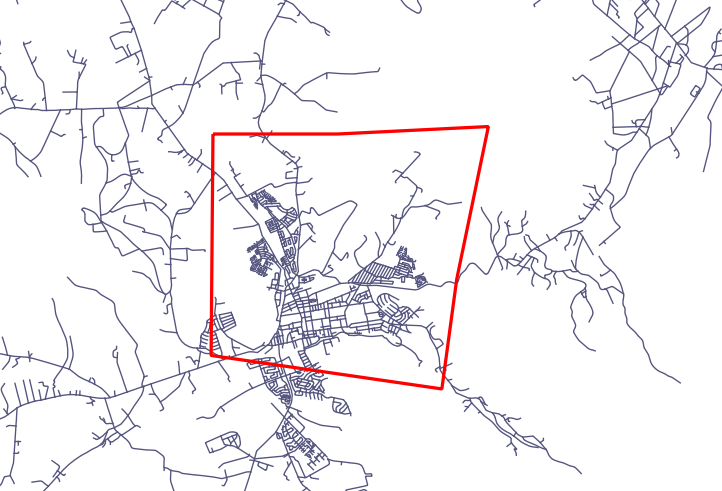
select st_intersection(a.geom, b.geom), b.*
from clip as a, road_lines as b
where not st_isempty(st_intersection(st_setsrid(a.geom,32734),
  b.geom));
16.5.10. 从其他几何对象构建新几何
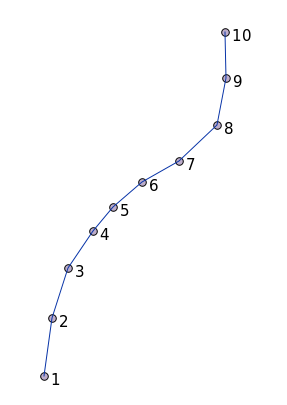
From a given point table, you want to generate a linestring. The order of the
points is defined by their id. Another ordering method could be a
timestamp, such as the one you get when you capture waypoints with a GPS
receiver.
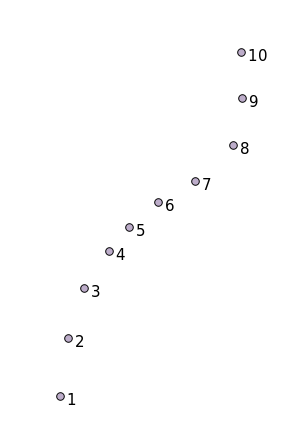
要从名为 'points' 的新点图层创建一条线串,可运行以下命令:
select ST_LineFromMultiPoint(st_collect(geom)), 1 as id
from (
  select geom
  from points
  order by id
) as foo;
若不想创建新图层,也可直接在 'people' 表上运行此命令以查看效果,尽管在现实中这样做并无实际意义。
16.5.11. 几何清理
有关此主题的更多信息,请参见 这篇博客文章。
16.5.12. 表之间的差异
要检测两个结构相同的表之间的差异,可使用 PostgreSQL 关键字 EXCEPT:
select * from table_a
except
select * from table_b;
As the result, you will get all records from table_a which are not stored in
table_b.
16.5.13. 表空间
您可通过创建表空间来指定 PostgreSQL 在磁盘上存储数据的位置:
CREATE TABLESPACE homespace LOCATION '/home/pg';
创建数据库时,可指定使用哪个表空间,例如:
createdb --tablespace=homespace t4a
16.5.14. 总结
您已学习了如何使用 PostGIS 语句创建更复杂的几何图形。请记住,这主要是为了提升您通过 GIS 前端操作空间数据库时的隐性知识。通常您无需手动输入这些语句,但了解其基本结构将有助于您使用 GIS,尤其是在遇到原本看似晦涩的错误时。