重要
翻訳は あなたが参加できる コミュニティの取り組みです。このページは現在 100.00% 翻訳されています。
16.5. レッスン: ジオメトリの構成
このセクションでは単純なジオメトリがSQL内でどのように構成されるかを少し掘り下げます。実際には、QGIS のような GIS を使用し、そのデジタイズツールを使って複雑なジオメトリを作るでしょう。しかし、それらがどのように形作られているかを知ることは、クエリを書いたりデータベースがどのように作られているかを理解するのに役立ちます。
このレッスンの目的: PostgreSQL で空間要素を直接作成する方法をよく理解すること。
16.5.1. ラインストリングの作成
address データベースに戻って、その他と一致するstreetsテーブルを取得してみましょう。すなわち、ジオメトリ、インデックスと geometry_columns テーブル中のエントリに制約を持ちます。
16.5.2. やってみよう: ★★☆ (中級レベル)
streetテーブルを修正して、タイプST_LineStringのジオメトリ列を持つようにします。ジオメトリ列のテーブルに伴う更新を行うことを忘れないでください!
また制約を追加して、LINESTRINGでもnullでもないジオメトリが追加されることを防ぎます。
新しいジオメトリ列に空間インデックスを作成します。
答え
alter table streets add column geom geometry;
alter table streets add constraint streets_geom_point_chk check
     (st_geometrytype(geom) = 'ST_LineString'::text OR geom IS NULL);
insert into geometry_columns values ('','public','streets','geom',2,4326,
     'LINESTRING');
create index streets_geo_idx
  on streets
  using gist
  (geom);
次に、streetテーブルにラインストリングを挿入しましょう。この場合、既存のstreetレコードを更新します:
update streets
set geom = 'SRID=4326;LINESTRING(20 -33, 21 -34, 24 -33)'
where streets.id=2;
結果をQGISで確認してみます。(「レイヤ」パネルのstreetsレイヤを右クリックし、「レイヤの領域にズームする」を選択する必要があるかもしれません。)
いくつかはQGISから、いくつかはコマンドラインからstreetのエントリをもう少し追加します。
16.5.3. ポリゴンの作成
ポリゴンの作成も簡単です。覚えておくべきことの1つは、ポリゴンには少なくとも4つの頂点があり、最後と最初のものが同じ場所にあることです。
insert into cities (name, geom)
values ('Tokyo', 'SRID=4326;POLYGON((10 -10, 5 -32, 30 -27, 10 -10))');
注釈
ポリゴンは、その座標リストの周りに二重括弧を必要とします。これは、複数の連結していない領域を持つ複雑なポリゴンを追加できるようにするためです。例えば
insert into cities (name, geom)
values ('Tokyo Outer Wards',
        'SRID=4326;POLYGON((20 10, 20 20, 35 20, 20 10),
                           (-10 -30, -5 0, -15 -15, -10 -30))'
        );
この手順に従った場合、QGISにcitiesデータセットをロードし、属性テーブルを開き、新しいエントリを選択することで、何をしたか確認できます。二つの新しいポリゴンが1つのポリゴンのように振る舞うかに注意してください。
16.5.4. 練習:CitiesをPeopleにリンクする
この演習では次のことを行う必要があります。
peopleテーブルからすべてのデータを削除します。
citiesテーブルの主キーを参照するpeopleへの外部キー列を追加します。
QGISを使っていくつかのcitiesをキャプチャします。
SQLを使って、それぞれが関連したstreetとcityを持った、新しいpeopleレコードをいくつか挿入してください。
更新されたpeopleのスキーマは、次のようになります:
\d people

Table "public.people"
   Column   |         Type          |                      Modifiers
 -----------+-----------------------+--------------------------------------------
  id        | integer               | not null
            |                       | default nextval('people_id_seq'::regclass)
  name      | character varying(50) |
  house_no  | integer               | not null
  street_id | integer               | not null
  phone_no  | character varying     |
  geom      | geometry              |
  city_id   | integer               | not null
Indexes:
  "people_pkey" PRIMARY KEY, btree (id)
  "people_name_idx" btree (name)
Check constraints:
  "people_geom_point_chk" CHECK (st_geometrytype(geom) =
                       'ST_Point'::text OR geom IS NULL)
Foreign-key constraints:
  "people_city_id_fkey" FOREIGN KEY (city_id) REFERENCES cities(id)
  "people_street_id_fkey" FOREIGN KEY (street_id) REFERENCES streets(id)
答え
delete from people;
alter table people add column city_id int not null references cities(id);
(QGISでcitiesをキャプチャする)
insert into people (name,house_no, street_id, phone_no, city_id, geom)
   values ('Faulty Towers',
           34,
           3,
           '072 812 31 28',
           1,
           'SRID=4326;POINT(13 -15)');

insert into people (name,house_no, street_id, phone_no, city_id, geom)
   values ('IP Knightly',
           32,
           1,
           '071 812 31 28',
           1,
           'SRID=4326;POINT(18 -24)');

insert into people (name,house_no, street_id, phone_no, city_id, geom)
   values ('Rusty Bedsprings',
           39,
           1,
           '071 822 31 28',
           1,
           'SRID=4326;POINT(22 -25)');
次のエラーメッセージが出た場合:
ERROR:  insert or update on table "people" violates foreign key constraint
        "people_city_id_fkey"
DETAIL: Key (city_id)=(1) is not present in table "cities".
これは、citiesテーブルのポリゴンを作成する実験中に、そのうちのいくつかを削除してやり直したことを意味します。citiesテーブルのエントリを確認して、存在する id を使ってみてください。
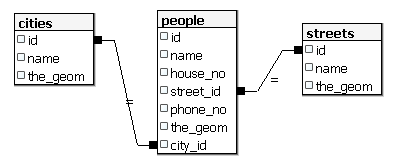
16.5.5. スキーマに着目する
スキーマはこのように見えるべきです:
16.5.6. やってみよう: ★★★ (上級レベル)
その都市のすべてのアドレスの最小凸包を計算し、その領域の周りのバッファを計算することにより、都市の境界線を作成します。
答え
'Tokyo Outer Wards' 市に何人か加えます
INSERT INTO people (name, house_no, street_id, phone_no, city_id, geom)
   VALUES ('Bad Aboum',
           57,
           2,
           '073 712 31 21',
           2,
           'SRID=4326;POINT(22 18)');

INSERT INTO people (name, house_no, street_id, phone_no, city_id, geom)
   VALUES ('Pat Atra',
           59,
           2,
           '074 712 31 25',
           2,
           'SRID=4326;POINT(23 14)');

INSERT INTO people (name, house_no, street_id, phone_no, city_id, geom)
   VALUES ('Kat Herin',
           65,
           2,
           '074 722 31 28',
           2,
           'SRID=4326;POINT(29 18)');
myPolygonTableテーブルを生成します
CREATE TABLE myPolygonTable (
  id serial NOT NULL PRIMARY KEY,
  city_id int NOT NULL REFERENCES cities(id),
  geom geometry NOT NULL
);

ALTER TABLE myPolygonTable
  ADD CONSTRAINT myPolygonTable_geom_polygon_chk
  CHECK (st_geometrytype(geom) = 'ST_Polygon'::text );
凸包を作成して読み込みます
INSERT INTO myPolygonTable (city_id, geom)
  SELECT * FROM
  (
    SELECT
      ROW_NUMBER() over (order by city_id)::integer AS city_id,
      ST_CONVEXHULL(ST_COLLECT(geom)) AS geom
        FROM people
        GROUP BY city_id
  ) convexHulls;
16.5.7. サブオブジェクトへのアクセス
SFS-モデルの機能を使用すると、SFSジオメトリのサブオブジェクトにアクセスするための様々なオプションを持ちます。テーブル myPolygonTable 内の全てのポリゴンジオメトリの最初の頂点を選択したいときは、このような方法でこれを実行する必要があります:
ポリゴン境界をラインストリングに変換する:
select st_boundary(geom) from myPolygonTable;
結果のラインストリングの最初の頂点を選択します:
select st_startpoint(myGeometry)
from (
    select st_boundary(geom) as myGeometry
    from myPolygonTable) as foo;
16.5.8. データプロセシング
PostGISでは、すべてのOGC SFS/MM標準準拠関数をサポートしています。これらの関数はすべて ST_ で始まります。
16.5.9. クリッピング
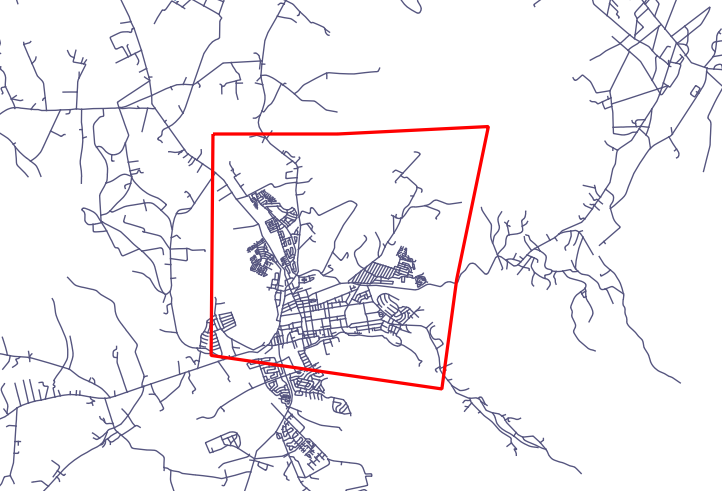
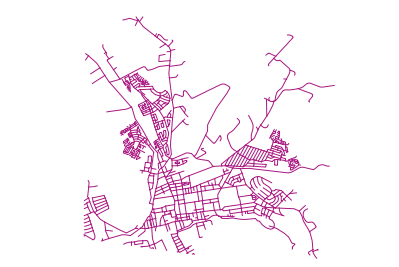
データのサブパートをクリップするには、 ST_INTERSECT() 関数を使用します。空のジオメトリを避けるには、次のようにします。
where not st_isempty(st_intersection(a.geom, b.geom))
select st_intersection(a.geom, b.geom), b.*
from clip as a, road_lines as b
where not st_isempty(st_intersection(st_setsrid(a.geom,32734),
  b.geom));
16.5.10. ジオメトリを他のジオメトリから構築する
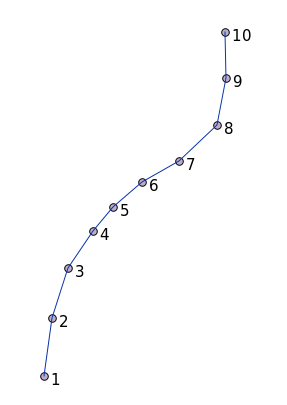
与えられたポイントテーブルから、ラインストリングを生成します。ポイントの順序は、その id によって定義されます。別の並べ方は、GPS受信機でウェイポイントをキャプチャするときに得るような、タイムスタンプになりうるかもしれません。
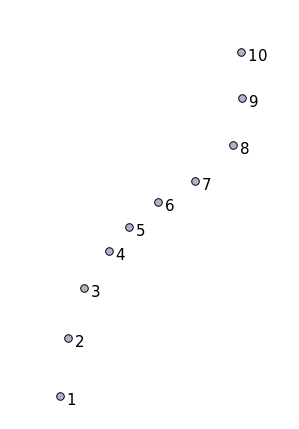
'points' という新しいポイントレイヤからラインストリングを作成するには、次のコマンドを実行します:
select ST_LineFromMultiPoint(st_collect(geom)), 1 as id
from (
  select geom
  from points
  order by id
) as foo;
どのように機能するかを新しいレイヤを作らずに確認するために、'people' レイヤにこのコマンドを実行することもできます。もちろん、これを行うことに現実世界の意味はほとんどないでしょうが。
16.5.11. ジオメトリクリーニング
このトピックについては このブログエントリ にもっと情報があります。
16.5.12. テーブル間の差
同じ構造を持つ2つのテーブルの差を検出するには、PostgreSQLキーワード EXCEPT を使用します:
select * from table_a
except
select * from table_b;
結果として、table_a から table_b に格納されていない全てのレコードが得られるでしょう。
16.5.13. 表領域
Postgresがディスク上にデータを格納する場所を定義するには、表領域を作成します。
CREATE TABLESPACE homespace LOCATION '/home/pg';
データベースを作成するときは、例えばどの表領域を使用するか指定できます:
createdb --tablespace=homespace t4a
16.5.14. 結論
PostGISの文を使用して、より複雑なジオメトリを作成する方法を学びました。これはGISのフロントエンドを通じて地理対応データベースを操作するときは、暗黙知を向上させることがほとんどであることに留意してください。これらのステートメントを実際に手動で入力する必要は普通はありませんが、その構造について一般的な知識を持っておくと、GISを使用するときに、特にそうでなければ不可解と思うであろうエラーが発生したときに、役に立ちます。