Important
翻译是一项社区工作:ref:you can join <translation_guidelines>。此页面目前翻译进度为 100.00%。
16.5. 课程:几何构造
在本节中,我们将更深入地探讨如何在 SQL 中构造简单几何图形。实际上,您可能会使用 QGIS 等 GIS 软件,通过其数字化工具创建复杂几何图形;然而,了解其构造方式有助于编写查询语句,并理解数据库是如何组织的。
本课程目标: 更好地理解如何在 PostgreSQL/PostGIS 中直接创建空间实体。
16.5.1. 创建线(Linestrings)
回到我们的 address 数据库,让我们调整 streets 表,使其与其他表一致:即对几何字段设置约束、创建空间索引,并在 geometry_columns 表中添加相应条目。
16.5.2. 自己试试:★★☆(中等难度)
修改 streets 表,使其包含一个类型为 ST_LineString 的几何列。
别忘了同步更新 geometry_columns 表!
同时添加一个约束,防止插入非 LINESTRING 或非空的几何对象。
在新的几何列上创建空间索引
答案
alter table streets add column geom geometry;
alter table streets add constraint streets_geom_point_chk check
     (st_geometrytype(geom) = 'ST_LineString'::text OR geom IS NULL);
insert into geometry_columns values ('','public','streets','geom',2,4326,
     'LINESTRING');
create index streets_geo_idx
  on streets
  using gist
  (geom);
现在我们在 streets 表中插入一条线。此处我们将更新一条已有的街道记录:
update streets
set geom = 'SRID=4326;LINESTRING(20 -33, 21 -34, 24 -33)'
where streets.id=2;
在 QGIS 中查看结果。(您可能需要在“图层”面板中右键单击 streets 图层,然后选择“缩放到图层范围”。)
现在再创建一些街道记录——部分通过 QGIS,部分通过命令行。
16.5.3. 创建多边形
创建多边形同样简单。需注意:根据定义,多边形至少有四个顶点,且首尾顶点必须重合:
insert into cities (name, geom)
values ('Tokyo', 'SRID=4326;POLYGON((10 -10, 5 -32, 30 -27, 10 -10))');
Note
多边形的坐标列表需使用双层括号;这是为了支持包含多个不相连区域的复杂多边形。例如
insert into cities (name, geom)
values ('Tokyo Outer Wards',
        'SRID=4326;POLYGON((20 10, 20 20, 35 20, 20 10),
                           (-10 -30, -5 0, -15 -15, -10 -30))'
        );
如果您执行了此步骤,可通过将 cities 数据集加载到 QGIS、打开其属性表并选择新条目来验证结果。注意,这两个新多边形将表现为一个整体。
16.5.4. 练习:将城市与人员关联
本练习请完成以下操作:
清空 people 表中的所有数据。
在 people 表中添加一个外键列,引用 cities 表的主键。
使用 QGIS 采集若干城市。
使用 SQL 插入若干新的人员记录,确保每条记录都关联一条街道和一个城市。
更新后的 people 表结构应类似如下:
\d people

Table "public.people"
   Column   |         Type          |                      Modifiers
 -----------+-----------------------+--------------------------------------------
  id        | integer               | not null
            |                       | default nextval('people_id_seq'::regclass)
  name      | character varying(50) |
  house_no  | integer               | not null
  street_id | integer               | not null
  phone_no  | character varying     |
  geom      | geometry              |
  city_id   | integer               | not null
Indexes:
  "people_pkey" PRIMARY KEY, btree (id)
  "people_name_idx" btree (name)
Check constraints:
  "people_geom_point_chk" CHECK (st_geometrytype(geom) =
                       'ST_Point'::text OR geom IS NULL)
Foreign-key constraints:
  "people_city_id_fkey" FOREIGN KEY (city_id) REFERENCES cities(id)
  "people_street_id_fkey" FOREIGN KEY (street_id) REFERENCES streets(id)
答案
delete from people;
alter table people add column city_id int not null references cities(id);
(在 QGIS 中采集城市)
insert into people (name,house_no, street_id, phone_no, city_id, geom)
   values ('Faulty Towers',
           34,
           3,
           '072 812 31 28',
           1,
           'SRID=4326;POINT(13 -15)');

insert into people (name,house_no, street_id, phone_no, city_id, geom)
   values ('IP Knightly',
           32,
           1,
           '071 812 31 28',
           1,
           'SRID=4326;POINT(18 -24)');

insert into people (name,house_no, street_id, phone_no, city_id, geom)
   values ('Rusty Bedsprings',
           39,
           1,
           '071 822 31 28',
           1,
           'SRID=4326;POINT(22 -25)');
如果您收到以下错误信息:
ERROR:  insert or update on table "people" violates foreign key constraint
        "people_city_id_fkey"
DETAIL: Key (city_id)=(1) is not present in table "cities".
这意味着您在为 cities 表创建多边形时可能删除了部分记录并重新开始。请检查 cities 表中的条目,使用任意一个已存在的 id 即可。
16.5.5. 查看我们的数据库结构
目前我们的数据库结构应如下所示:
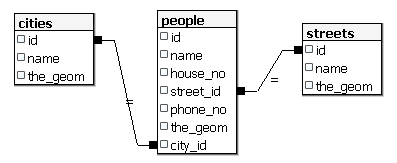
16.5.6. 自己试试:★★★(高级难度)
通过计算某城市所有地址点的最小凸包(convex hull),并对其外围创建缓冲区,生成该城市的边界。
答案
在“Tokyo Outer Wards”城市中添加若干人员
INSERT INTO people (name, house_no, street_id, phone_no, city_id, geom)
   VALUES ('Bad Aboum',
           57,
           2,
           '073 712 31 21',
           2,
           'SRID=4326;POINT(22 18)');

INSERT INTO people (name, house_no, street_id, phone_no, city_id, geom)
   VALUES ('Pat Atra',
           59,
           2,
           '074 712 31 25',
           2,
           'SRID=4326;POINT(23 14)');

INSERT INTO people (name, house_no, street_id, phone_no, city_id, geom)
   VALUES ('Kat Herin',
           65,
           2,
           '074 722 31 28',
           2,
           'SRID=4326;POINT(29 18)');
创建 myPolygonTable 表
CREATE TABLE myPolygonTable (
  id serial NOT NULL PRIMARY KEY,
  city_id int NOT NULL REFERENCES cities(id),
  geom geometry NOT NULL
);

ALTER TABLE myPolygonTable
  ADD CONSTRAINT myPolygonTable_geom_polygon_chk
  CHECK (st_geometrytype(geom) = 'ST_Polygon'::text );
创建并加载凸包
INSERT INTO myPolygonTable (city_id, geom)
  SELECT * FROM
  (
    SELECT
      ROW_NUMBER() over (order by city_id)::integer AS city_id,
      ST_CONVEXHULL(ST_COLLECT(geom)) AS geom
        FROM people
        GROUP BY city_id
  ) convexHulls;
16.5.7. 访问子对象
借助 SFS 模型函数,您可以多种方式访问 SFS 几何对象的子对象。例如,若要选择 myPolygonTable 表中每个多边形几何的第一个顶点,需按如下方式操作:
将多边形边界转换为线串:
select st_boundary(geom) from myPolygonTable;
选择所得线串的第一个顶点:
select st_startpoint(myGeometry)
from (
    select st_boundary(geom) as myGeometry
    from myPolygonTable) as foo;
16.5.8. 数据处理
PostGIS 支持所有符合 OGC SFS/MM 标准的函数,这些函数均以 ST_ 开头。
16.5.9. 裁剪
要裁剪数据的某一部分,可使用 ST_INTERSECTION() 函数。为避免生成空几何,可使用以下方式:
where not st_isempty(st_intersection(a.geom, b.geom))
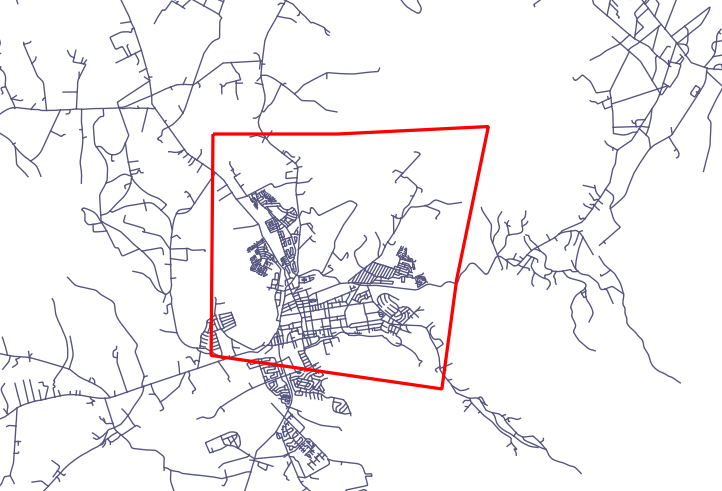
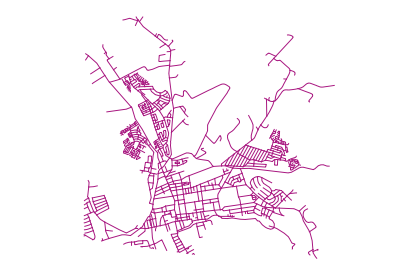
select st_intersection(a.geom, b.geom), b.*
from clip as a, road_lines as b
where not st_isempty(st_intersection(st_setsrid(a.geom,32734),
  b.geom));
16.5.10. 从其他几何对象构建新几何
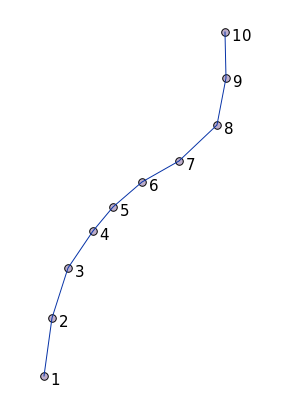
给定一个点表,您希望生成一条线串。点的顺序由其 id 决定;另一种排序方式可以是时间戳,例如使用 GPS 接收器采集航点时所记录的时间。
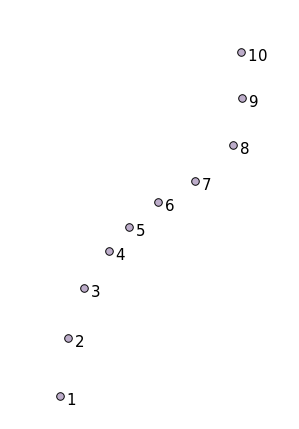
要从名为 'points' 的新点图层创建一条线串,可运行以下命令:
select ST_LineFromMultiPoint(st_collect(geom)), 1 as id
from (
  select geom
  from points
  order by id
) as foo;
若不想创建新图层,也可直接在 'people' 表上运行此命令以查看效果,尽管在现实中这样做并无实际意义。
16.5.11. 几何清理
有关此主题的更多信息,请参见 这篇博客文章。
16.5.12. 表之间的差异
要检测两个结构相同的表之间的差异,可使用 PostgreSQL 关键字 EXCEPT:
select * from table_a
except
select * from table_b;
结果将返回所有存在于 table_a 但不在 table_b 中的记录。
16.5.13. 表空间
您可通过创建表空间来指定 PostgreSQL 在磁盘上存储数据的位置:
CREATE TABLESPACE homespace LOCATION '/home/pg';
创建数据库时,可指定使用哪个表空间,例如:
createdb --tablespace=homespace t4a
16.5.14. 总结
您已学习了如何使用 PostGIS 语句创建更复杂的几何图形。请记住,这主要是为了提升您通过 GIS 前端操作空间数据库时的隐性知识。通常您无需手动输入这些语句,但了解其基本结构将有助于您使用 GIS,尤其是在遇到原本看似晦涩的错误时。