重要
翻訳は あなたが参加できる コミュニティの取り組みです。このページは現在 78.19% 翻訳されています。
24.1.15. 点群の変換
注意
Running these algorithms requires QGIS installed with PDAL >= 2.5.0 (see menu).
24.1.15.1. フォーマット変換
Added in 3.32
Converts a point cloud to a different file format, e.g. creates a compressed .LAZ.
パラメータ
ラベル |
名前 |
データ型 |
説明 |
|---|---|---|---|
入力レイヤ |
|
[点群] |
Input point cloud layer to convert |
出力レイヤ |
|
[点群] デフォルト: |
出力として使用する点群ファイルを指定します。次のいずれかです:
|
出力
ラベル |
名前 |
データ型 |
説明 |
|---|---|---|---|
出力レイヤ |
|
[点群] |
Output point cloud layer in a modified file format.
Currently supported formats are |
Python コード
Algorithm ID: pdal:convertformat
import processing
processing.run("algorithm_id", {parameter_dictionary})
algorithm id は、プロセシングツールボックス内でアルゴリズムにマウスカーソルを乗せた際に表示されるIDです。 parameter dictionary は、パラメータの「名前」とその値を指定するマッピング型です。Python コンソールからプロセシングアルゴリズムを実行する方法の詳細については、 プロセシングアルゴリズムをコンソールから使う を参照してください。
24.1.15.2. Export to raster
Added in 3.32
Exports point cloud data to a 2D raster grid having cell size of given resolution, writing values from the specified attribute.
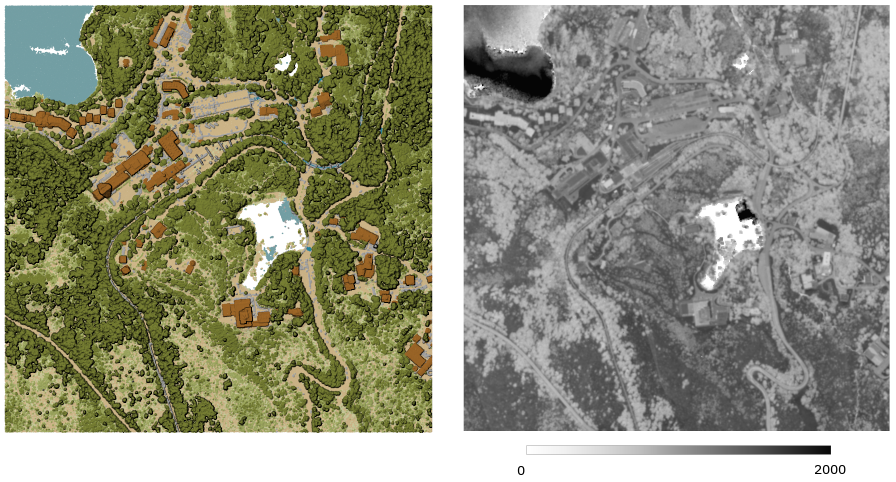
図 24.41 Raster output using Intensity attribute of points
パラメータ
基本パラメータ
ラベル |
名前 |
データ型 |
説明 |
|---|---|---|---|
入力レイヤ |
|
[点群] |
Input point cloud layer to export |
属性 |
|
[field] [enumeration] |
A Field of the point cloud layer to extract the values from |
Resolution of the density raster |
|
[数値: double] デフォルト: 1.0 |
Cell size of the output raster |
Tile size for parallel runs |
|
[数値: Integer] デフォルト: 1000 |
|
Exported |
|
[ラスタ] デフォルト: |
Specify the raster file to export the data to. One of:
|
詳細パラメータ
ラベル |
名前 |
データ型 |
説明 |
|---|---|---|---|
フィルタ式 オプション |
|
[式] |
点群データ内の地物のサブセットを選択するための PDAL式 |
切り抜く範囲 オプション |
|
[範囲] |
点群データ内の地物のサブセットを選択するためのマップ範囲 利用可能な方法:
|
X origin of a tile for parallel runs オプション |
|
[数値: double] |
|
Y origin of a tile for parallel runs オプション |
|
[数値: double] |
出力
ラベル |
名前 |
データ型 |
説明 |
|---|---|---|---|
Exported |
|
[ラスタ] |
Output raster layer features of the point cloud layer are exported to.
Currently supported format is |
Python コード
Algorithm ID: pdal:exportraster
import processing
processing.run("algorithm_id", {parameter_dictionary})
algorithm id は、プロセシングツールボックス内でアルゴリズムにマウスカーソルを乗せた際に表示されるIDです。 parameter dictionary は、パラメータの「名前」とその値を指定するマッピング型です。Python コンソールからプロセシングアルゴリズムを実行する方法の詳細については、 プロセシングアルゴリズムをコンソールから使う を参照してください。
24.1.15.3. Export to raster (using triangulation)
Added in 3.32
Exports point cloud data to a 2D raster grid using a triangulation of points and then interpolating cell values from triangles.
注釈
Using this algorithm can be slower if you are dealing with a large dataset. If your point cloud is dense, you can export your ground points as a raster using the Export to raster algorithm.
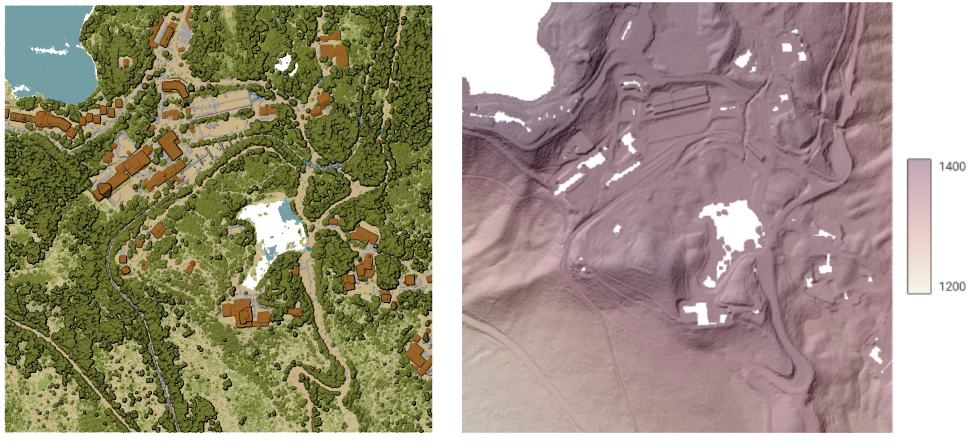
図 24.42 Terrain raster output generated by point cloud triangulation
パラメータ
基本パラメータ
ラベル |
名前 |
データ型 |
説明 |
|---|---|---|---|
入力レイヤ |
|
[点群] |
Input point cloud layer to export |
Resolution of the density raster |
|
[数値: double] デフォルト: 1.0 |
Cell size of the output raster |
Tile size for parallel runs |
|
[数値: Integer] デフォルト: 1000 |
|
Exported |
|
[ラスタ] デフォルト: |
Specify the raster file to export the data to. One of:
|
詳細パラメータ
ラベル |
名前 |
データ型 |
説明 |
|---|---|---|---|
フィルタ式 オプション |
|
[式] |
点群データ内の地物のサブセットを選択するための PDAL式 |
切り抜く範囲 オプション |
|
[範囲] |
点群データ内の地物のサブセットを選択するためのマップ範囲 利用可能な方法:
|
X origin of a tile for parallel runs オプション |
|
[数値: double] |
|
Y origin of a tile for parallel runs オプション |
|
[数値: double] |
出力
ラベル |
名前 |
データ型 |
説明 |
|---|---|---|---|
Exported (using triangulation) |
|
[ラスタ] |
Output raster layer features of the point cloud layer are exported to.
Currently supported format is |
Python コード
Algorithm ID: pdal:exportrastertin
import processing
processing.run("algorithm_id", {parameter_dictionary})
algorithm id は、プロセシングツールボックス内でアルゴリズムにマウスカーソルを乗せた際に表示されるIDです。 parameter dictionary は、パラメータの「名前」とその値を指定するマッピング型です。Python コンソールからプロセシングアルゴリズムを実行する方法の詳細については、 プロセシングアルゴリズムをコンソールから使う を参照してください。
24.1.15.4. Export to vector
Added in 3.32
Exports point cloud data to a vector layer with 3D points (a GeoPackage), optionally with extra attributes.
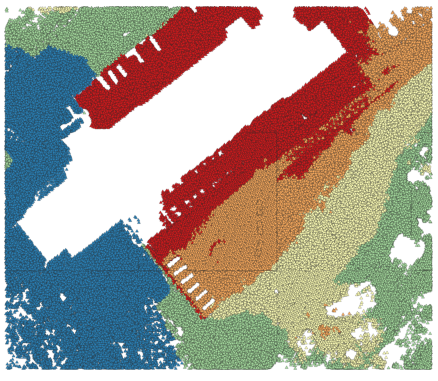
図 24.43 Exporting point cloud (ground points) to a vector layer styled based on the elevation
パラメータ
基本パラメータ
ラベル |
名前 |
データ型 |
説明 |
|---|---|---|---|
入力レイヤ |
|
[点群] |
Input point cloud layer to export |
属性 オプション |
|
[field] [list] |
One or more fields of the point cloud layer to export with the points. |
Exported |
|
[ベクタ] デフォルト: |
Specify the vector file to export the data to. One of:
|
詳細パラメータ
ラベル |
名前 |
データ型 |
説明 |
|---|---|---|---|
フィルタ式 オプション |
|
[式] |
点群データ内の地物のサブセットを選択するための PDAL式 |
切り抜く範囲 オプション |
|
[範囲] |
点群データ内の地物のサブセットを選択するためのマップ範囲 利用可能な方法:
|
出力
ラベル |
名前 |
データ型 |
説明 |
|---|---|---|---|
Exported |
|
[ベクタ] |
Output vector layer features of the point cloud layer are exported to.
Currently supported format is |
Python コード
Algorithm ID: pdal:exportvector
import processing
processing.run("algorithm_id", {parameter_dictionary})
algorithm id は、プロセシングツールボックス内でアルゴリズムにマウスカーソルを乗せた際に表示されるIDです。 parameter dictionary は、パラメータの「名前」とその値を指定するマッピング型です。Python コンソールからプロセシングアルゴリズムを実行する方法の詳細については、 プロセシングアルゴリズムをコンソールから使う を参照してください。