Důležité
Translation is a community effort you can join. This page is currently translated at 38.95%.
24.1.17. Point Cloud Extraction
Výstraha
Running these algorithms requires QGIS installed with PDAL >= 2.5.0 (see menu).
24.1.17.1. Boundary
Added in 3.32
Exports a polygon file containing point cloud layer boundary. It may contain holes and it may be a multi-part polygon.
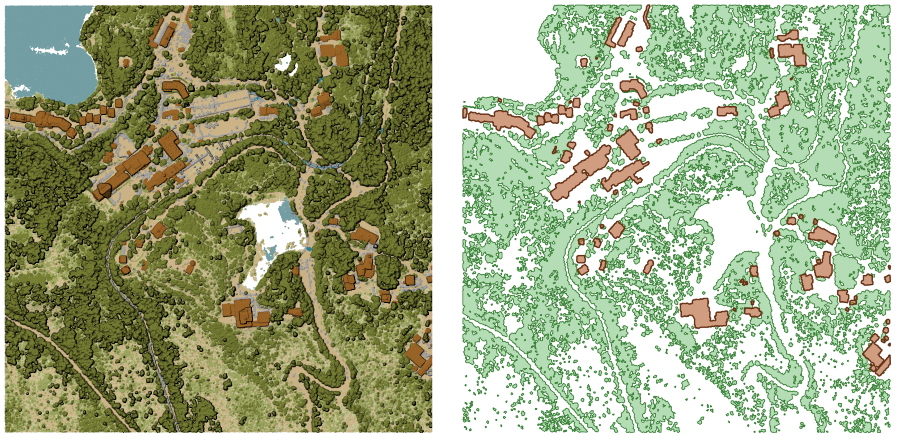
Obr. 24.47 Extracting high vegetation and building polygons from an input point cloud layer
Parameters
Basic parameters
Label |
Název |
Druh |
Popis |
|---|---|---|---|
Input layer |
|
[point cloud] |
Input point cloud layer to calculate boundary for |
Resolution of cells used to calculate boundary Volitelné |
|
[numeric: double] |
Resolution of cells used to calculate boundary |
Minimal number of points in a cell to consider cell occupied Volitelné |
|
[numeric: integer] |
Minimal number of points in a cell to consider cell occupied |
Boundary |
|
[vector: polygon] Default: |
Specify the point cloud file to use as output. One of:
|
Pokročilé parametry
Label |
Název |
Druh |
Popis |
|---|---|---|---|
Filter expression Volitelné |
|
[expression] |
A PDAL expression for selecting a subset of features in the point cloud data |
Cropping extent Volitelné |
|
[extent] |
A map extent for selecting a subset of features in the point cloud data Dostupné metody jsou:
|
Outputs
Label |
Název |
Druh |
Popis |
|---|---|---|---|
Boundary |
|
[vector: polygon] |
Output polygon vector layer with the point cloud boundary.
Currently supported format is |
Python kód
Algorithm ID: pdal:boundary
import processing
processing.run("algorithm_id", {parameter_dictionary})
The algorithm id is displayed when you hover over the algorithm in the Processing Toolbox. The parameter dictionary provides the parameter NAMEs and values. See Using processing algorithms from the console for details on how to run processing algorithms from the Python console.
24.1.17.2. Density
Added in 3.32
Exports a raster file based on the number of points within each raster cell - useful for quality checking of point cloud datasets.
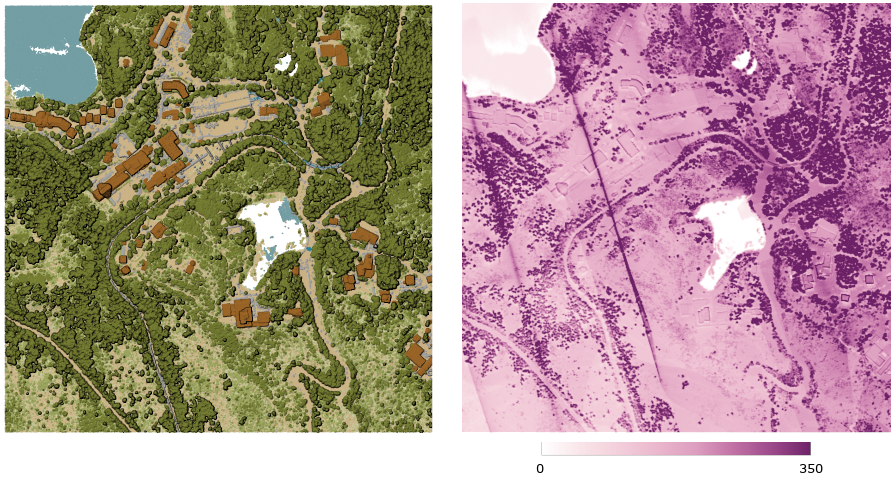
Obr. 24.48 Point density (number of points per 2x2 m) as a raster
Parameters
Basic parameters
Label |
Název |
Druh |
Popis |
|---|---|---|---|
Input layer |
|
[point cloud] |
Input point cloud layer to export |
Resolution of the density raster |
|
[numeric: double] Default: 1.0 |
Cell size of the output raster |
Tile size for parallel runs |
|
[numeric: integer] Default: 1000 |
Size of the tiles to split the data into for parallel runs |
Density |
|
[raster] Default: |
Specify the raster file to export the data to. One of:
|
Pokročilé parametry
Label |
Název |
Druh |
Popis |
|---|---|---|---|
Filter expression Volitelné |
|
[expression] |
A PDAL expression for selecting a subset of features in the point cloud data |
Cropping extent Volitelné |
|
[extent] |
A map extent for selecting a subset of features in the point cloud data Dostupné metody jsou:
|
X origin of a tile for parallel runs Volitelné |
|
[numeric: double] |
|
Y origin of a tile for parallel runs Volitelné |
|
[numeric: double] |
Outputs
Label |
Název |
Druh |
Popis |
|---|---|---|---|
Density |
|
[raster] |
Output raster layer with number of points within each cell.
Currently supported format is |
Python kód
Algorithm ID: pdal:density
import processing
processing.run("algorithm_id", {parameter_dictionary})
The algorithm id is displayed when you hover over the algorithm in the Processing Toolbox. The parameter dictionary provides the parameter NAMEs and values. See Using processing algorithms from the console for details on how to run processing algorithms from the Python console.
24.1.17.3. Filter
Added in 3.32
Extracts point from the input point cloud which match PDAL expression and/or are inside of a cropping rectangle.
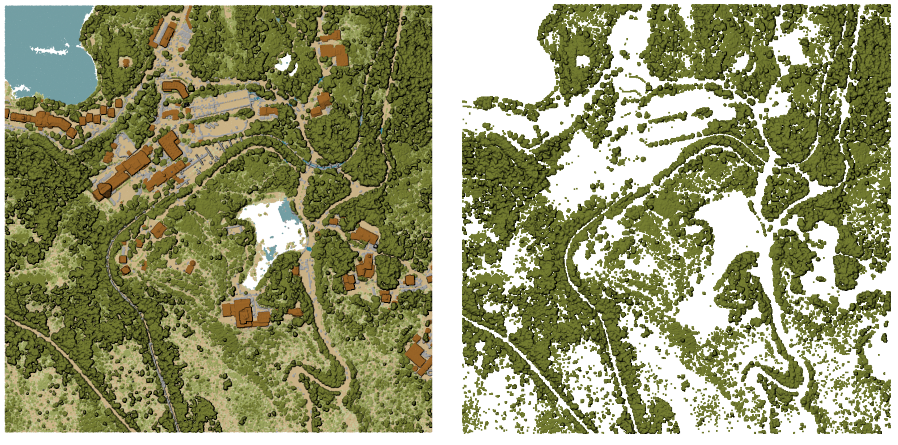
Obr. 24.49 Filtering of high vegetation class from an input point cloud layer
Parameters
Label |
Název |
Druh |
Popis |
|---|---|---|---|
Input layer |
|
[point cloud] |
Input point cloud layer to export |
Filter expression Volitelné |
|
[expression] |
A PDAL expression for selecting a subset of features in the point cloud data |
Cropping extent Volitelné |
|
[extent] |
A map extent for selecting a subset of features in the point cloud data Dostupné metody jsou:
|
Filtered |
|
[point cloud] Default: |
Specify the point cloud file to export the data to. One of:
|
Outputs
Label |
Název |
Druh |
Popis |
|---|---|---|---|
Filtered |
|
[point cloud] |
Output point cloud layer with the filtered features of the input point cloud layer.
Currently supported formats are |
Python kód
Algorithm ID: pdal:filter
import processing
processing.run("algorithm_id", {parameter_dictionary})
The algorithm id is displayed when you hover over the algorithm in the Processing Toolbox. The parameter dictionary provides the parameter NAMEs and values. See Using processing algorithms from the console for details on how to run processing algorithms from the Python console.