network_advanced_parameters
Advanced parameters
Etichetă |
Nume |
Tipul |
Descriere |
|---|---|---|---|
Direction field Opţional |
|
[tablefield: string] Default: 0.0 |
The field used to specify directions for the network edges. The values used in this field are specified with the three
parameters |
Value for forward direction Opţional |
|
[string] Default: «» (empty string) |
Value set in the direction field to identify edges with a forward direction |
Value for backward direction Opţional |
|
[string] Default: «» (empty string) |
Value set in the direction field to identify edges with a backward direction |
Value for both directions Opţional |
|
[string] Default: «» (empty string) |
Value set in the direction field to identify bidirectional edges |
Default direction Opţional |
|
[enumeration] Default: 2 |
If a feature has no value set in the direction field or if no direction field is set, then this direction value is used. One of:
|
Speed field Opţional |
|
[tablefield: string] |
Field providing the speed value (in If a feature does not have a value in this field, or
no field is set then the default speed value (provided
with the |
Default speed (km/h) Opţional |
|
[number] Default: 50.0 |
Value to use to calculate the travel time if no speed field is provided for an edge |
Topology tolerance Opţional |
|
[number] Default: 0.0 |
Two lines with nodes closer than the specified tolerance are considered connected |
end_network_advanced_parameters
network_advanced_parameters_table
Direction field Opţional |
|
[tablefield: string] Default: 0.0 |
The field used to specify directions for the network edges. The values used in this field are specified with the three
parameters |
Value for forward direction Opţional |
|
[string] Default: «» (empty string) |
Value set in the direction field to identify edges with a forward direction |
Value for backward direction Opţional |
|
[string] Default: «» (empty string) |
Value set in the direction field to identify edges with a backward direction |
Value for both directions Opţional |
|
[string] Default: «» (empty string) |
Value set in the direction field to identify bidirectional edges |
Default direction Opţional |
|
[enumeration] Default: 2 |
If a feature has no value set in the direction field or if no direction field is set, then this direction value is used. One of:
|
Speed field Opţional |
|
[tablefield: string] |
Field providing the speed value (in If a feature does not have a value in this field, or
no field is set then the default speed value (provided
with the |
Default speed (km/h) Opţional |
|
[number] Default: 50.0 |
Value to use to calculate the travel time if no speed field is provided for an edge |
Topology tolerance Opţional |
|
[number] Default: 0.0 |
Two lines with nodes closer than the specified tolerance are considered connected |
end_network_advanced_parameters_table
network_advanced_parameters_service_area
Advanced parameters
Etichetă |
Nume |
Tipul |
Descriere |
|---|---|---|---|
Direction field Opţional |
|
[tablefield: string] Default: 0.0 |
The field used to specify directions for the network edges. The values used in this field are specified with the three
parameters |
Value for forward direction Opţional |
|
[string] Default: «» (empty string) |
Value set in the direction field to identify edges with a forward direction |
Value for backward direction Opţional |
|
[string] Default: «» (empty string) |
Value set in the direction field to identify edges with a backward direction |
Value for both directions Opţional |
|
[string] Default: «» (empty string) |
Value set in the direction field to identify bidirectional edges |
Default direction Opţional |
|
[enumeration] Default: 2 |
If a feature has no value set in the direction field or if no direction field is set, then this direction value is used. One of:
|
Speed field Opţional |
|
[tablefield: string] |
Field providing the speed value (in If a feature does not have a value in this field, or
no field is set then the default speed value (provided
with the |
Default speed (km/h) Opţional |
|
[number] Default: 50.0 |
Value to use to calculate the travel time if no speed field is provided for an edge |
Topology tolerance Opţional |
|
[number] Default: 0.0 |
Two lines with nodes closer than the specified tolerance are considered connected |
Include upper/lower bound points |
|
[boolean] Default: False |
Creates a point layer output with two points for each edge at the boundaries of the service area. One point is the start of that edge, the other is the end. |
end_network_advanced_parameters_service_area
geometric_predicates
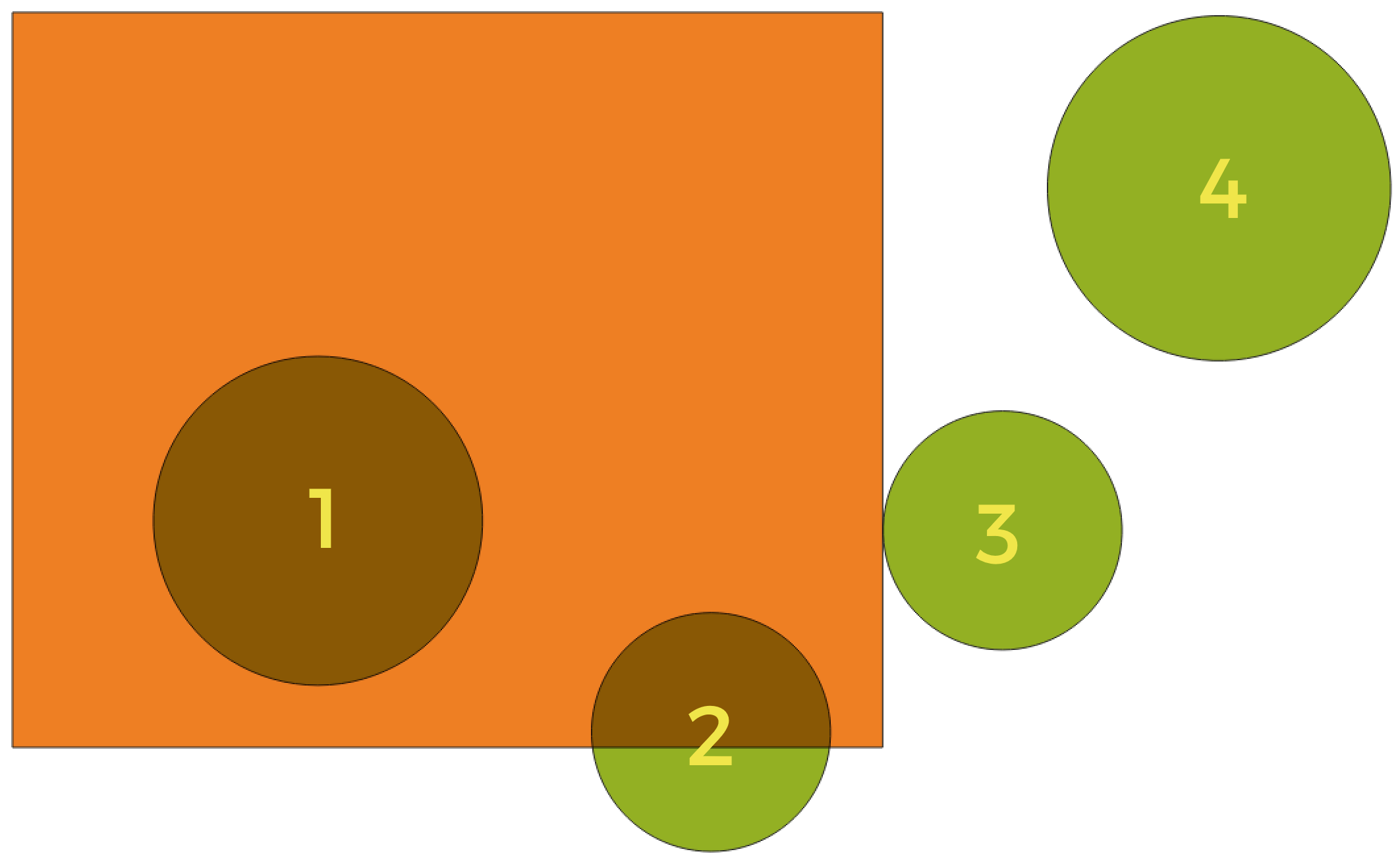
In this example, the dataset from which we want to select (the source vector layer) consists of the green circles, the orange rectangle is the dataset that it is being compared to (the intersection vector layer).
Available geometric predicates are:
- Intersect
Tests whether a geometry intersects another. Returns 1 (true) if the geometries spatially intersect (share any portion of space - overlap or touch) and 0 if they don’t. In the picture above, this will select circles 1, 2 and 3.
- Contain
Returns 1 (true) if and only if no points of b lie in the exterior of a, and at least one point of the interior of b lies in the interior of a. In the picture, no circle is selected, but the rectangle would be if you would select it the other way around, as it contains a circle completely. This is the opposite of are within.
- Disjoint
Returns 1 (true) if the geometries do not share any portion of space (no overlap, not touching). Only circle 4 is selected.
- Equal
Returns 1 (true) if and only if geometries are exactly the same. No circles will be selected.
- Touch
Tests whether a geometry touches another. Returns 1 (true) if the geometries have at least one point in common, but their interiors do not intersect. Only circle 3 is selected.
- Overlap
Tests whether a geometry overlaps another. Returns 1 (true) if the geometries share space, are of the same dimension, but are not completely contained by each other. Only circle 2 is selected.
- Are within
Tests whether a geometry is within another. Returns 1 (true) if geometry a is completely inside geometry b. Only circle 1 is selected.
- Cross
Returns 1 (true) if the supplied geometries have some, but not all, interior points in common and the actual crossing is of a lower dimension than the highest supplied geometry. For example, a line crossing a polygon will cross as a line (selected). Two lines crossing will cross as a point (selected). Two polygons cross as a polygon (not selected).
end_geometric_predicates
postgisexecutesqlexample
Example
Set all the values of an existing field to a fixed value. The SQL query string will be:
UPDATE your_table SET field_to_update=20;
In the example above, the values of the field
field_to_updateof the tableyour_tablewill be all set to20.Create a new
areacolumn and calculate the area of each feature with theST_AREAPostGIS function.-- Create the new column "area" on the table your_table" ALTER TABLE your_table ADD COLUMN area double precision; -- Update the "area" column and calculate the area of each feature: UPDATE your_table SET area=ST_AREA(geom);
end_postgisexecutesqlexample
algorithm_code_section
import processing
processing.run("algorithm_id", {parameter_dictionary})
ID-ul algoritmului se afișează atunci când treceți peste algoritmul din caseta instrumentelor de procesare. Dicționarul parametrilor furnizează valorile și NUMELE parametrilor. Pentru detalii despre rularea algoritmilor de procesare din consola Python, parcurgeți Utilizarea algoritmilor de procesare din consolă.
end_algorithm_code_section
Algorithm Output Types
Directory
directory_output_types
Save to a Temporary Directory
Save to Directory
end_directory_output_types
directory_output_types_skip
Skip Output
Save to a Temporary Directory
Save to Directory
end_directory_output_types_skip
File
file_output_types
Save to a Temporary File
Save to File…
end_file_output_types
file_output_types_skip
Skip Output
Save to a Temporary File
Save to File…
end_file_output_types_skip
Layer
layer_output_types
Create Temporary Layer (
TEMPORARY_OUTPUT)Save to File…
Save to Geopackage…
Save to Database Table…
The file encoding can also be changed here.
end_layer_output_types
layer_output_types_append
Create Temporary Layer (
TEMPORARY_OUTPUT)Save to File…
Save to Geopackage…
Save to Database Table…
Append to Layer…
The file encoding can also be changed here.
end_layer_output_types_append
layer_output_types_skip
Skip Output
Create Temporary Layer (
TEMPORARY_OUTPUT)Save to File…
Save to Geopackage…
Save to Database Table…
The file encoding can also be changed here.
end_layer_output_types_skip