network_advanced_parameters
Parâmetros avançados
Etiqueta |
Nome |
Tipo |
Descrição |
|---|---|---|---|
Campo de direção Opcional |
|
[tablefield: string] Padrão: 0.0 |
The field used to specify directions for the network edges. Os valores usados neste campo são especificados com os três parâmetros |
Value for forward direction Opcional |
|
[string] Padrão: ‘’ (string vazia) |
Value set in the direction field to identify edges with a forward direction |
Value for backward direction Opcional |
|
[string] Padrão: ‘’ (string vazia) |
Value set in the direction field to identify edges with a backward direction |
Value for both directions Opcional |
|
[string] Padrão: ‘’ (string vazia) |
Value set in the direction field to identify bidirectional edges |
Direção padrão Opcional |
|
[enumeration] Padrão: 2 |
If a feature has no value set in the direction field or if no direction field is set, then this direction value is used. One of:
|
Campo de velocidade Opcional |
|
[tablefield: string] |
Field providing the speed value (in Se uma feição não tiver um valor nesse campo ou nenhum campo estiver definido, o valor da velocidade padrão (fornecido com o parâmetro |
Velocidade padrão (km/h) Opcional |
|
[number] Padrão: 50.0 |
Value to use to calculate the travel time if no speed field is provided for an edge |
Topology tolerance Opcional |
|
[number] Padrão: 0.0 |
Duas linhas com nós mais próximos que a tolerância especificada são consideradas conectadas |
end_network_advanced_parameters
network_advanced_parameters_table
Campo de direção Opcional |
|
[tablefield: string] Padrão: 0.0 |
The field used to specify directions for the network edges. Os valores usados neste campo são especificados com os três parâmetros |
Value for forward direction Opcional |
|
[string] Padrão: ‘’ (string vazia) |
Value set in the direction field to identify edges with a forward direction |
Value for backward direction Opcional |
|
[string] Padrão: ‘’ (string vazia) |
Value set in the direction field to identify edges with a backward direction |
Value for both directions Opcional |
|
[string] Padrão: ‘’ (string vazia) |
Value set in the direction field to identify bidirectional edges |
Direção padrão Opcional |
|
[enumeration] Padrão: 2 |
If a feature has no value set in the direction field or if no direction field is set, then this direction value is used. One of:
|
Campo de velocidade Opcional |
|
[tablefield: string] |
Field providing the speed value (in Se uma feição não tiver um valor nesse campo ou nenhum campo estiver definido, o valor da velocidade padrão (fornecido com o parâmetro |
Velocidade padrão (km/h) Opcional |
|
[number] Padrão: 50.0 |
Value to use to calculate the travel time if no speed field is provided for an edge |
Topology tolerance Opcional |
|
[number] Padrão: 0.0 |
Duas linhas com nós mais próximos que a tolerância especificada são consideradas conectadas |
end_network_advanced_parameters_table
network_advanced_parameters_service_area
Parâmetros avançados
Etiqueta |
Nome |
Tipo |
Descrição |
|---|---|---|---|
Campo de direção Opcional |
|
[tablefield: string] Padrão: 0.0 |
The field used to specify directions for the network edges. Os valores usados neste campo são especificados com os três parâmetros |
Value for forward direction Opcional |
|
[string] Padrão: ‘’ (string vazia) |
Value set in the direction field to identify edges with a forward direction |
Value for backward direction Opcional |
|
[string] Padrão: ‘’ (string vazia) |
Value set in the direction field to identify edges with a backward direction |
Value for both directions Opcional |
|
[string] Padrão: ‘’ (string vazia) |
Value set in the direction field to identify bidirectional edges |
Direção padrão Opcional |
|
[enumeration] Padrão: 2 |
If a feature has no value set in the direction field or if no direction field is set, then this direction value is used. One of:
|
Campo de velocidade Opcional |
|
[tablefield: string] |
Field providing the speed value (in Se uma feição não tiver um valor nesse campo ou nenhum campo estiver definido, o valor da velocidade padrão (fornecido com o parâmetro |
Velocidade padrão (km/h) Opcional |
|
[number] Padrão: 50.0 |
Value to use to calculate the travel time if no speed field is provided for an edge |
Topology tolerance Opcional |
|
[number] Padrão: 0.0 |
Duas linhas com nós mais próximos que a tolerância especificada são consideradas conectadas |
Include upper/lower bound points |
|
[boolean] Padrão: Falso |
Creates a point layer output with two points for each edge at the boundaries of the service area. One point is the start of that edge, the other is the end. |
end_network_advanced_parameters_service_area
geometric_predicates
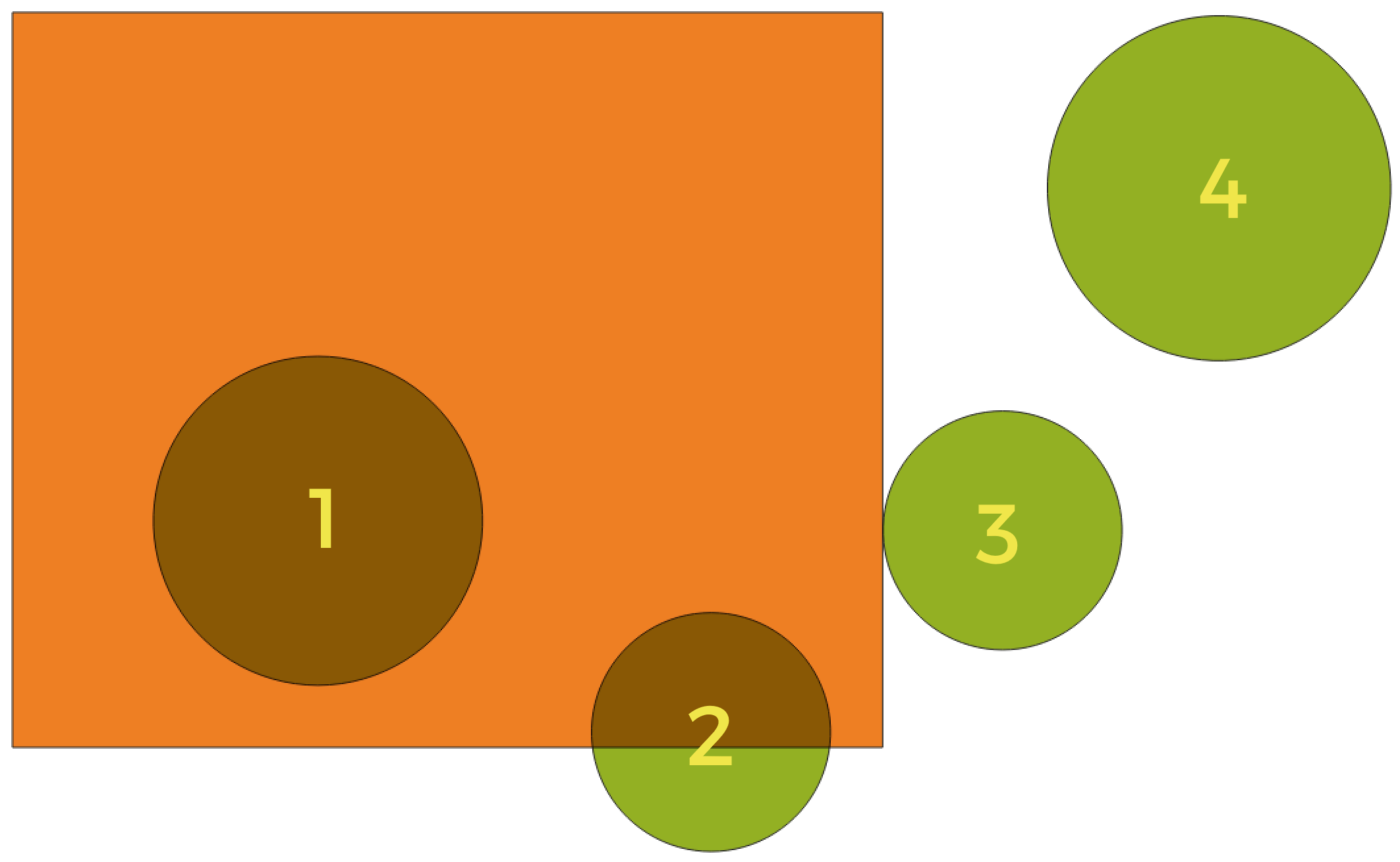
In this example, the dataset from which we want to select (the source vector layer) consists of the green circles, the orange rectangle is the dataset that it is being compared to (the intersection vector layer).
Available geometric predicates are:
- Intersect
Tests whether a geometry intersects another. Returns 1 (true) if the geometries spatially intersect (share any portion of space - overlap or touch) and 0 if they don’t. In the picture above, this will select circles 1, 2 and 3.
- Contain
Retorna 1 (verdadeiro) se e somente se nenhum ponto de b estiver no exterior de a e pelo menos um ponto do interior de b estiver no interior de a. Na imagem, nenhum círculo é selecionado, mas o retângulo seria se você o selecionasse ao contrário, pois ele contém um círculo completamente. Este é o oposto de are within.
- Disjoint
Returns 1 (true) if the geometries do not share any portion of space (no overlap, not touching). Only circle 4 is selected.
- Igual
Retorna 1 (verdadeiro) se e somente se as geometrias forem exatamente iguais. Nenhum círculo será selecionado.
- Touch
Testa se uma geometria toca em outra. Retorna 1 (verdadeiro) se as geometrias tiverem pelo menos um ponto em comum, mas seus interiores não se cruzam. Somente o círculo 3 está selecionado.
- Overlap
Testa se uma geometria sobrepõe outra. Retorna 1 (verdadeiro) se as geometrias compartilharem espaço, têm a mesma dimensão, mas não estão completamente contidas uma na outra. Somente o círculo 2 está selecionado.
- Are within
Tests whether a geometry is within another. Returns 1 (true) if geometry a is completely inside geometry b. Only circle 1 is selected.
- Cross
Retorna 1 (verdadeiro) se as geometrias fornecidas tiverem alguns pontos internos em comum, mas não todos, e o cruzamento real tiver uma dimensão menor que a maior geometria fornecida. Por exemplo, uma linha cruzando um polígono cruzará como uma linha (selecionada). O cruzamento de duas linhas cruzará como um ponto (selecionado). Dois polígonos cruzam como um polígono (não selecionado).
end_geometric_predicates
postgisexecutesqlexample
Exemplo
Set all the values of an existing field to a fixed value. The SQL query string will be:
UPDATE your_table SET field_to_update=20;
In the example above, the values of the field
field_to_updateof the tableyour_tablewill be all set to20.Create a new
areacolumn and calculate the area of each feature with theST_AREAPostGIS function.-- Create the new column "area" on the table your_table" ALTER TABLE your_table ADD COLUMN area double precision; -- Update the "area" column and calculate the area of each feature: UPDATE your_table SET area=ST_AREA(geom);
end_postgisexecutesqlexample
algorithm_code_section
import processing
processing.run("algorithm_id", {parameter_dictionary})
The algorithm id is displayed when you hover over the algorithm in the Processing Toolbox. The parameter dictionary provides the parameter NAMEs and values. See Usando os algoritmos do processamento a partir do Terminal Python. for details on how to run processing algorithms from the Python console.
end_algorithm_code_section
Algorithm Output Types
Directory
directory_output_types
Save to a Temporary Directory
Save to Directory
end_directory_output_types
directory_output_types_skip
Skip Output
Save to a Temporary Directory
Save to Directory
end_directory_output_types_skip
File
file_output_types
Save to a Temporary File
Save to File…
end_file_output_types
file_output_types_skip
Skip Output
Save to a Temporary File
Save to File…
end_file_output_types_skip
Layer
layer_output_types
Create Temporary Layer (
TEMPORARY_OUTPUT)Save to File…
Save to Geopackage…
Save to Database Table…
The file encoding can also be changed here.
end_layer_output_types
layer_output_types_append
Create Temporary Layer (
TEMPORARY_OUTPUT)Save to File…
Save to Geopackage…
Save to Database Table…
Append to Layer…
The file encoding can also be changed here.
end_layer_output_types_append
layer_output_types_skip
Skip Output
Create Temporary Layer (
TEMPORARY_OUTPUT)Save to File…
Save to Geopackage…
Save to Database Table…
The file encoding can also be changed here.
end_layer_output_types_skip