Important
Traducerea este un efort al comunității, la care puteți să vă alăturați. În prezent, această pagină este tradusă 60.00%.
16.5. Lesson: Geometry Construction
În această secțiune vom intra în detalii despre cum sunt construite geometriile în SQL. În realitate, probabil veți utiliza un GIS cum ar fi QGIS pentru creearea geometriilor complexe folosind instrumentele acestora; cu toate acestea, întelegerea modului cum sunt stocate poate fi utilă pentru scrierea de interogări și înțelegerea modului cum este alcătuită baza de date.
The goal of this lesson: To better understand how to create spatial entities directly in PostgreSQL.
16.5.1. Crearea Șirurilor de Linii
Going back to our address database, let’s get our streets table matching
the others; i.e., having a constraint on the geometry, an index and an entry in
the geometry_columns table.
16.5.2. Încercați și dvs.: ★★☆
Modify the
streetstable so that it has a geometry column of type ST_LineString.Nu uitați să faceți actualizarea coloanelor de geometrie!
De asemenea, adăugați o constrângere pentru a preveni adăugarea geometrii care nu sunt null sau de tip LINESTRINGS.
Creați un index spațial în noua coloană de geometrie
Răspuns
alter table streets add column geom geometry;
alter table streets add constraint streets_geom_point_chk check
     (st_geometrytype(geom) = 'ST_LineString'::text OR geom IS NULL);
insert into geometry_columns values ('','public','streets','geom',2,4326,
     'LINESTRING');
create index streets_geo_idx
  on streets
  using gist
  (geom);
Now let’s insert a linestring into our streets table. In this case we will update an existing street record:
update streets
set geom = 'SRID=4326;LINESTRING(20 -33, 21 -34, 24 -33)'
where streets.id=2;
Aruncați o privire la rezultatele din QGIS. (Poate fi necesar să faceți clic-dreapta pe stratul străzilor din panoul «Straturilor», apoi alegeți «Transfocare la extinderea stratului».)
Acum, creați mai multe intrări de străzi - unele în QGIS, iar altele din linia de comandă.
16.5.3. Crearea Poligoanelor
Creating polygons is just as easy. One thing to remember is that by definition, polygons have at least four vertices, with the last and first being co-located:
insert into cities (name, geom)
values ('Tokyo', 'SRID=4326;POLYGON((10 -10, 5 -32, 30 -27, 10 -10))');
Notă
Un poligon necesită acolade duble în jurul listei sale de coordonate; aceasta pentru a permite poligoane complexe având multiple zone neconectate. De exemplu
insert into cities (name, geom)
values ('Tokyo Outer Wards',
        'SRID=4326;POLYGON((20 10, 20 20, 35 20, 20 10),
                           (-10 -30, -5 0, -15 -15, -10 -30))'
        );
Dacă ați urmat acest pas, puteți verifica rezultatul prin încărcarea setului de date orașe în QGIS, deschizând tabelul de atribute al acestuia, și selectând noua intrare. Remarcați cum cele două noi poligoane se comportă ca unul singur.
16.5.4. Exercițiu: Learea Orașelor de Persoane
Pentru acest exercițiu ar trebui să faceți următoarele:
Ștergeți toate datele din tabela de personal.
Adăugați o coloană de cheie străină în tabela de personal, care face referire la cheia primară a tabelei orașelor.
Utilizați QGIS pentru a captura unele orașe.
Utilizați SQL pentru a introduce câteva înregistrări de personal, verificând că fiecare are asociate o stradă și un oraș.
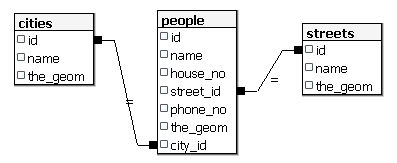
Your updated people schema should look something like this:
\d people

Table "public.people"
   Column   |         Type          |                      Modifiers
 -----------+-----------------------+--------------------------------------------
  id        | integer               | not null
            |                       | default nextval('people_id_seq'::regclass)
  name      | character varying(50) |
  house_no  | integer               | not null
  street_id | integer               | not null
  phone_no  | character varying     |
  geom      | geometry              |
  city_id   | integer               | not null
Indexes:
  "people_pkey" PRIMARY KEY, btree (id)
  "people_name_idx" btree (name)
Check constraints:
  "people_geom_point_chk" CHECK (st_geometrytype(geom) =
                       'ST_Point'::text OR geom IS NULL)
Foreign-key constraints:
  "people_city_id_fkey" FOREIGN KEY (city_id) REFERENCES cities(id)
  "people_street_id_fkey" FOREIGN KEY (street_id) REFERENCES streets(id)
Răspuns
delete from people;
alter table people add column city_id int not null references cities(id);
(capture cities in QGIS)
insert into people (name,house_no, street_id, phone_no, city_id, geom)
   values ('Faulty Towers',
           34,
           3,
           '072 812 31 28',
           1,
           'SRID=4326;POINT(13 -15)');

insert into people (name,house_no, street_id, phone_no, city_id, geom)
   values ('IP Knightly',
           32,
           1,
           '071 812 31 28',
           1,
           'SRID=4326;POINT(18 -24)');

insert into people (name,house_no, street_id, phone_no, city_id, geom)
   values ('Rusty Bedsprings',
           39,
           1,
           '071 822 31 28',
           1,
           'SRID=4326;POINT(22 -25)');
If you’re getting the following error message:
ERROR:  insert or update on table "people" violates foreign key constraint
        "people_city_id_fkey"
DETAIL: Key (city_id)=(1) is not present in table "cities".
then it means that while experimenting with creating polygons for the
cities table, you must have deleted some of them and started over. Just
check the entries in your cities table and use any id which exists.
16.5.5. Analizați Schema Noastră
Acum, schrma noastră ar trebui să arate în felul următor:
16.5.6. Încercați și dvs.: ★★★
Creați marginile orașelor prin calucularea înfășurătorii convexe pentru toate adresele din acel oraș și calcularea unei zone tampon în jurul acesteia.
Răspuns
Add some people in «Tokyo Outer Wards» city
INSERT INTO people (name, house_no, street_id, phone_no, city_id, geom)
   VALUES ('Bad Aboum',
           57,
           2,
           '073 712 31 21',
           2,
           'SRID=4326;POINT(22 18)');

INSERT INTO people (name, house_no, street_id, phone_no, city_id, geom)
   VALUES ('Pat Atra',
           59,
           2,
           '074 712 31 25',
           2,
           'SRID=4326;POINT(23 14)');

INSERT INTO people (name, house_no, street_id, phone_no, city_id, geom)
   VALUES ('Kat Herin',
           65,
           2,
           '074 722 31 28',
           2,
           'SRID=4326;POINT(29 18)');
Create myPolygonTable table
CREATE TABLE myPolygonTable (
  id serial NOT NULL PRIMARY KEY,
  city_id int NOT NULL REFERENCES cities(id),
  geom geometry NOT NULL
);

ALTER TABLE myPolygonTable
  ADD CONSTRAINT myPolygonTable_geom_polygon_chk
  CHECK (st_geometrytype(geom) = 'ST_Polygon'::text );
Create and load the convex hulls
INSERT INTO myPolygonTable (city_id, geom)
  SELECT * FROM
  (
    SELECT
      ROW_NUMBER() over (order by city_id)::integer AS city_id,
      ST_CONVEXHULL(ST_COLLECT(geom)) AS geom
        FROM people
        GROUP BY city_id
  ) convexHulls;
16.5.7. Accesul la Sub-Obiecte
With the SFS-Model functions, you have a wide variety of options to access
sub-objects of SFS Geometries. When you want to select the first vertex point of
every polygon geometry in the table myPolygonTable, you have to do this in this
way:
Transform the polygon boundary to a linestring:
select st_boundary(geom) from myPolygonTable;
Select the first vertex point of the resultant linestring:
select st_startpoint(myGeometry)
from (
    select st_boundary(geom) as myGeometry
    from myPolygonTable) as foo;
16.5.8. Procesarea Datelor
PostGIS suportă toate funcțiile conforme standardelor OGC SFS/MM. Toate aceste funcții încep cu ST_.
16.5.9. Decuparea
To clip a subpart of your data you can use the ST_INTERSECT() function.
To avoid empty geometries, use:
where not st_isempty(st_intersection(a.geom, b.geom))
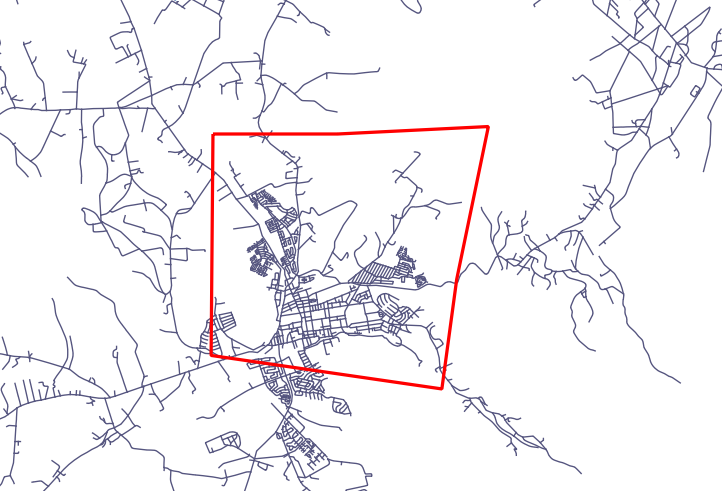
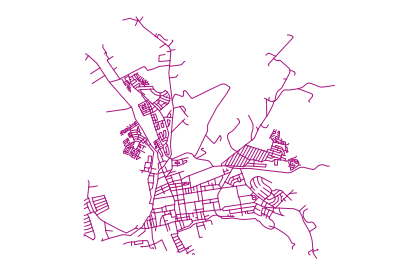
select st_intersection(a.geom, b.geom), b.*
from clip as a, road_lines as b
where not st_isempty(st_intersection(st_setsrid(a.geom,32734),
  b.geom));
16.5.10. Construirea de Geometrii pornind de la Alte Geometrii
From a given point table, you want to generate a linestring. The order of the
points is defined by their id. Another ordering method could be a
timestamp, such as the one you get when you capture waypoints with a GPS
receiver.
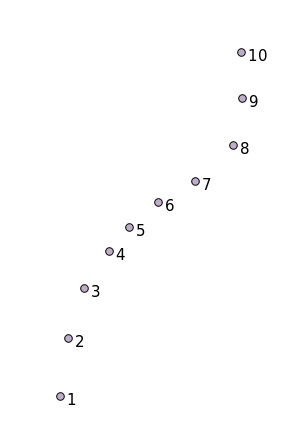
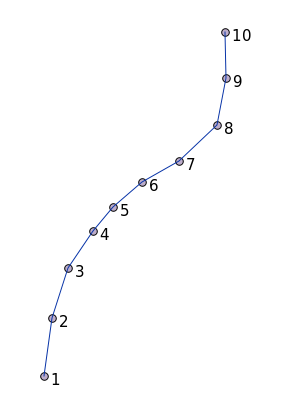
To create a linestring from a new point layer called «points», you can run the following command:
select ST_LineFromMultiPoint(st_collect(geom)), 1 as id
from (
  select geom
  from points
  order by id
) as foo;
Pentru a vedea cum funcționează fără a crea un nou strat, puteți executa această comandă în stratul «people», deși desigur nu ar avea prea mult sens în lumea reală.
16.5.11. Curățarea Geometriilor
You can get more information for this topic in this blog entry.
16.5.12. Diferențele dintre tabele
To detect the difference between two tables with the same structure, you can
use the PostgreSQL keyword EXCEPT:
select * from table_a
except
select * from table_b;
As the result, you will get all records from table_a which are not stored in
table_b.
16.5.13. Spațiile tabelelor
You can define where postgres should store its data on disk by creating tablespaces:
CREATE TABLESPACE homespace LOCATION '/home/pg';
When you create a database, you can then specify which tablespace to use e.g.:
createdb --tablespace=homespace t4a
16.5.14. În concluzie
Ați învățat cum să creeați geometrii mai complexe folosing instrucțiuni PostGIS. Rețineți că aceasta folosește la îmbunătățirea cunoștințelor pentru lucrul cu o bază de date spațială printr-o interfață GIS. În mod curent nu veți avea nevoie să folosiți aceste instrucțiuni manual, dar o înțelegere generală vă va ajuta la utilizarea unui GIS, în special dacă întâlniți erori care ar putea să pară altfel criptice.