24.1.16. Point Cloud Data Management
Attention
Running these algorithms requires QGIS installed with PDAL >= 2.5.0 (see menu).
24.1.16.1. Assign projection
Added in 3.32
Assigns a Coordinate Reference System to a point cloud layer, if it is missing or wrong. A new layer is created.
See also
Parameters
Basic parameters
Label |
Name |
Type |
Description |
|---|---|---|---|
Input layer |
|
[point cloud] |
Input point cloud layer to assign a CRS to |
Desired CRS |
|
[crs] |
The CRS to apply to the layer |
Output layer |
|
[point cloud] Default: |
Specify the point cloud file to use as output. One of:
|
Advanced parameters
Label |
Name |
Type |
Description |
|---|---|---|---|
VPC Output Format
|
|
[enumeration] Default: 0 |
Specify the underlying format in which data are stored
for Virtual Point Cloud (
LAZ/LAS may be faster to process, however they only allow rendering of the point cloud extents. |
Outputs
Label |
Name |
Type |
Description |
|---|---|---|---|
Converted |
|
[point cloud] |
Output point cloud layer with a new CRS.
Currently supported formats are |
Python code
Algorithm ID: pdal:assignprojection
import processing
processing.run("algorithm_id", {parameter_dictionary})
The algorithm id is displayed when you hover over the algorithm in the Processing Toolbox. The parameter dictionary provides the parameter NAMEs and values. See Using processing algorithms from the console for details on how to run processing algorithms from the Python console.
24.1.16.2. Build virtual point cloud (VPC)
Added in 3.32
Creates a virtual point cloud (VPC) from input point cloud data.
If you leave the optional parameters unchecked, the VPC file will be built very quickly as the algorithm will only read metadata of input files. With any of the optional parameters set, the algorithm will read all points which can take some time.
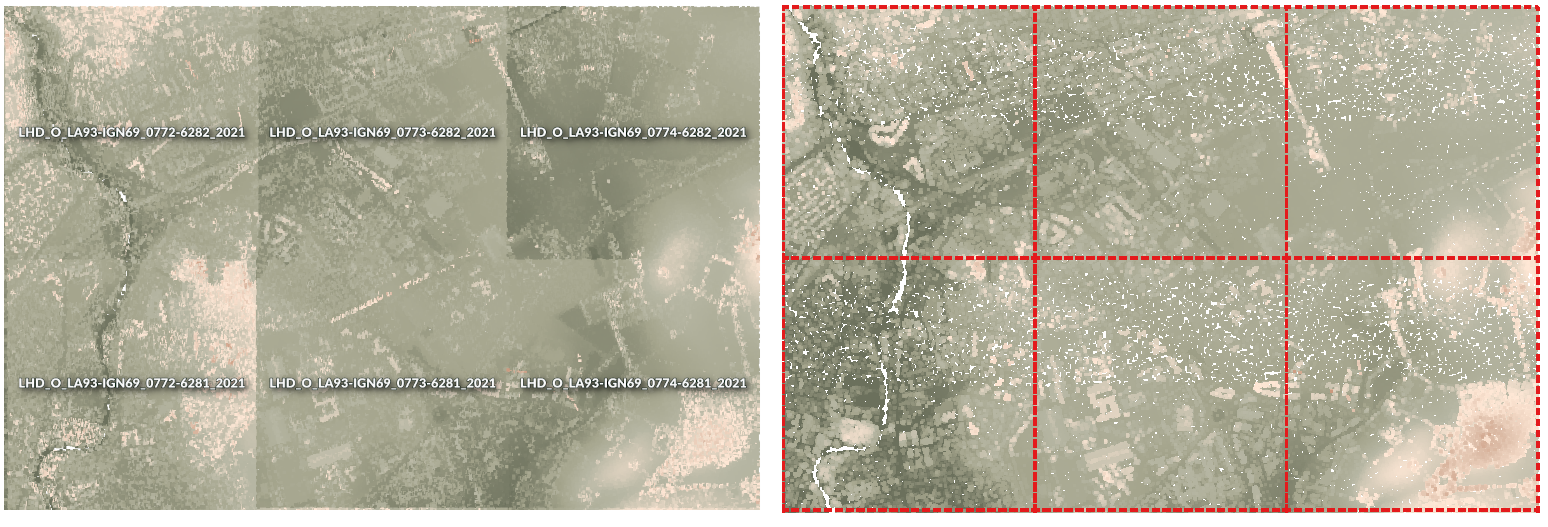
Fig. 24.44 Generating Virtual Point Cloud with overview from a set of point cloud tiles
See also
Parameters
Basic parameters
Label |
Name |
Type |
Description |
|---|---|---|---|
Input layers |
|
[point cloud] [list] |
Input point cloud layers to combine inside a virtual point cloud layer |
Calculate boundary polygon |
|
[boolean] Default: False |
Set to True to show the exact boundaries of data (rather than just rectangular extent) |
Calculate statistics |
|
[boolean] Default: False |
Set to True to understand ranges of values of the various attributes |
Build overview point cloud |
|
[boolean] Default: False |
Generates a single “thinned” point cloud of all the input data (using only every 1000th point from original data). The overview point cloud will be created next to the VPC file -
for example, for |
Convert individual files to COPC format
|
|
[boolean] Default: False |
When True, all the individual files in the virtual point cloud will also be converted
to When disabled, the format of each individual file will be preserved.
This is faster, however only the extent will be rendered for files using formats
other than |
Virtual point cloud |
|
[point cloud] Default: |
Specify the point cloud file to build the data into. One of:
|
Advanced parameters
Label |
Name |
Type |
Description |
|---|---|---|---|
Maximum width/height of tiled overviews Optional
|
|
[numeric: integer] Default: Not set |
When set, the overview point cloud is split into multiple tiled files using a tiling scheme, rather than being written as a single file for the whole VPC. Each tile will cover a maximum width and height of this value in layer CRS units. Tiled overviews are intended for very large point clouds where a single overview file would be too large. |
Outputs
Label |
Name |
Type |
Description |
|---|---|---|---|
Virtual point cloud |
|
[raster] |
Output point cloud layer combining all the input data, as a virtual file. |
Python code
Algorithm ID: pdal:virtualpointcloud
import processing
processing.run("algorithm_id", {parameter_dictionary})
The algorithm id is displayed when you hover over the algorithm in the Processing Toolbox. The parameter dictionary provides the parameter NAMEs and values. See Using processing algorithms from the console for details on how to run processing algorithms from the Python console.
24.1.16.3. Classify ground points
Added in 4.0
Classifies ground points using the Simple Morphological Filter (SMRF) algorithm. Analyses elevation differences and local surface structure to separate ground from non-ground points. Morphological filtering is applied to identify iteratively, considering various parameters such as cell size, slope, elevation threshold and window size.
Parameters
Basic parameters
Label |
Name |
Type |
Description |
|---|---|---|---|
Input layer |
|
[point cloud] |
Input point cloud layer to classify. |
Grid Cell Size |
|
[numeric: double] Default: 1.0 |
Cell size for processing grid (in map units). Smaller values gives finer detail but may increase noise. |
Scalar |
|
[numeric: double] Default: 1.25 |
Threshold for steeper slopes. Higher value if the terrain is rough, otherwise real ground might be misclassified. |
Slope |
|
[numeric: double] Default: 0.15 |
Slope threshold (rise over run). How much slope is tolerated as ground. Should be higher for steep terrain. |
Threshold |
|
[numeric: double] Default: 0.5 |
Elevation threshold for separating ground from objects. Higher values allow larger deviations from the ground. |
Window Size |
|
[numeric: double] Default: 18.0 |
Maximum filter window size. Higher values better identify large buildings or objects, smaller values protect smaller features. |
Classified Ground |
|
[point cloud] Default: |
Specify the point cloud file to export the classified ground points to. One of:
|
Advanced parameters
Label |
Name |
Type |
Description |
|---|---|---|---|
VPC Output Format |
|
[enumeration] Default: 0 |
Specify the underlying format in which data are stored
for Virtual Point Cloud (
LAZ/LAS may be faster to process, however only allow rendering of the point cloud extents. |
Outputs
Label |
Name |
Type |
Description |
|---|---|---|---|
Classified Ground |
|
[point cloud] |
Output point cloud with ground classification applied. |
Python code
Algorithm ID: pdal:classifyground
import processing
processing.run("algorithm_id", {parameter_dictionary})
The algorithm id is displayed when you hover over the algorithm in the Processing Toolbox. The parameter dictionary provides the parameter NAMEs and values. See Using processing algorithms from the console for details on how to run processing algorithms from the Python console.
24.1.16.4. Clip point cloud
Added in 3.32
Clips a point cloud layer by a polygon layer so that the resulting point cloud contains only points within the polygons.
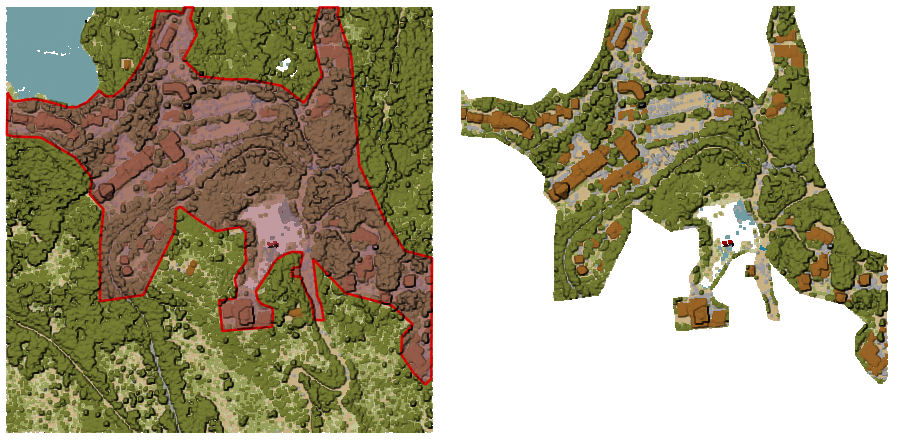
Fig. 24.45 Clipping an input point cloud layer with a polygon coverage
Parameters
Basic parameters
Label |
Name |
Type |
Description |
|---|---|---|---|
Input layer |
|
[point cloud] |
Input point cloud layer to clip |
Clipping polygons |
|
[vector: polygon] |
Polygon vector layer to use as coverage for clipping the points |
Clipped |
|
[point cloud] Default: |
Specify the point cloud file to export the clipped points to. One of:
|
Advanced parameters
Label |
Name |
Type |
Description |
|---|---|---|---|
Filter expression Optional |
|
[expression] |
A PDAL expression for selecting a subset of features in the point cloud data |
Cropping extent Optional |
|
[extent] |
A map extent for selecting a subset of features in the point cloud data Available methods are:
|
VPC Output Format
|
|
[enumeration] Default: 0 |
Specify the underlying format in which data are stored
for Virtual Point Cloud (
LAZ/LAS may be faster to process, however they only allow rendering of the point cloud extents. |
Outputs
Label |
Name |
Type |
Description |
|---|---|---|---|
Clipped |
|
[point cloud] |
Output point cloud whose features are the points within the coverage polygon layer. |
Python code
Algorithm ID: pdal:clip
import processing
processing.run("algorithm_id", {parameter_dictionary})
The algorithm id is displayed when you hover over the algorithm in the Processing Toolbox. The parameter dictionary provides the parameter NAMEs and values. See Using processing algorithms from the console for details on how to run processing algorithms from the Python console.
24.1.16.5. Compare point clouds
Added in 4.0
Compares two point clouds using an M3C2 (Multiscale Model-to-Model Cloud Comparison) algorithm and outputs a subset (filtered using Poisson sampling, based on Subsampling cell size parameter) of the original point cloud.
The M3C2 algorithm calculates the distance between two point clouds by considering the local orientation of the surface. It estimates surface normals at a user-defined scale and measures the average distance between clouds within a cylindrical projection along those normals.
The approach is highly robust against sensor and surface roughness, making it the standard for detecting change in complex natural environments. It also provides a sign (indicating whether a surface has moved in or out) and a statistically significant level of detection to distinguish real change from measurement error.
The output point cloud will have several new dimensions: m3c2_distance,
m3c2_uncertainty, m3c2_significant, m3c2_std_dev1, m3c2_std_dev2,
m3c2_count1 and m3c2_count2.
References: Lague, Dimitri, Nicolas Brodu, and Jérôme Leroux. Accurate 3D Comparison of Complex Topography with Terrestrial Laser Scanner: Application to the Rangitikei Canyon (N-Z). arXiv, 2013, https://arxiv.org/abs/1302.1183.
Attention
Running this algorithm requires QGIS installed with PDAL >= 2.10 (see menu).
Parameters
Basic parameters
Label |
Name |
Type |
Description |
|---|---|---|---|
Input layer |
|
[point cloud] |
Input point cloud layer to compare |
Compare layer |
|
[point cloud] |
Point cloud to compare against |
Subsampling cell size |
|
[numeric: double] Default: 0.0 |
Minimum spacing between points (in map units). |
Normal radius |
|
[numeric: double] Default: 2.0 |
Radius of the sphere around each core point that defines the neighbors from which normals are calculated. |
Cylinder radius |
|
[numeric: double] Default: 2.0 |
Radius of the cylinder inside of which points are searched for when calculating change. |
Cylinder half-length |
|
[numeric: double] Default: 2.0 |
The half-length of the cylinder of neighbors used for calculating change. |
Registration error |
|
[numeric: double] Default: 0.0 |
The estimated registration error between the two point clouds. |
Cylinder orientation |
|
[enumeration] Default: 0 |
Which direction to orient the cylinder/normal vector used for comparison between the two point clouds.
|
Comparison point cloud |
|
[point cloud] Default: |
Specify the point cloud file to export the comparison point cloud to. One of:
|
Advanced parameters
Label |
Name |
Type |
Description |
|---|---|---|---|
Filter expression Optional |
|
[expression] |
A PDAL expression for selecting a subset of features in the point cloud data |
Cropping extent Optional |
|
[extent] |
A map extent for selecting a subset of features in the point cloud data Available methods are:
|
Outputs
Label |
Name |
Type |
Description |
|---|---|---|---|
Comparison point cloud |
|
[point cloud] |
Output comparison point cloud. The output point cloud contains the following additional dimensions:
|
Python code
Algorithm ID: pdal:compare
import processing
processing.run("algorithm_id", {parameter_dictionary})
The algorithm id is displayed when you hover over the algorithm in the Processing Toolbox. The parameter dictionary provides the parameter NAMEs and values. See Using processing algorithms from the console for details on how to run processing algorithms from the Python console.
24.1.16.6. Create COPC
Added in 3.32
Creates the index for all the input point cloud files in a batch mode.
Parameters
Label |
Name |
Type |
Description |
|---|---|---|---|
Input layers |
|
[point cloud] [list] |
Input point cloud layers to create an index for |
Output directory Optional |
|
[folder] Default: |
Specify the folder to create the new files in. One of:
|
Outputs
Label |
Name |
Type |
Description |
|---|---|---|---|
Output directory |
|
[folder] |
Output folder containing point cloud layers with accompanying COPC index files. |
Python code
Algorithm ID: pdal:createcopc
import processing
processing.run("algorithm_id", {parameter_dictionary})
The algorithm id is displayed when you hover over the algorithm in the Processing Toolbox. The parameter dictionary provides the parameter NAMEs and values. See Using processing algorithms from the console for details on how to run processing algorithms from the Python console.
24.1.16.7. Create tiles from point cloud
Added in 3.32
Creates tiles from input point cloud files, recommended for best performance (in display or analysis) with such datasets in QGIS.
See also
Parameters
Basic parameters
Label |
Name |
Type |
Description |
|---|---|---|---|
Input layers |
|
[point cloud] [list] |
Input point cloud layers to create tiles from |
Tile length |
|
[numeric: double] Default: 1000.0 |
Size of the edge of each generated tile |
Output directory |
|
[folder] Default: |
Specify the folder to store the generated tiles. One of:
|
Advanced parameters
Label |
Name |
Type |
Description |
|---|---|---|---|
Assign CRS Optional |
|
[crs] |
The CRS to apply to the layer |
VPC Output Format
|
|
[enumeration] Default: 0 |
Specify the underlying format in which data are stored
for Virtual Point Cloud (
LAZ/LAS may be faster to process, however they only allow rendering of the point cloud extents. |
Outputs
Label |
Name |
Type |
Description |
|---|---|---|---|
Output directory |
|
[folder] |
Output folder containing the tiles generated from input files. |
Python code
Algorithm ID: pdal:tile
import processing
processing.run("algorithm_id", {parameter_dictionary})
The algorithm id is displayed when you hover over the algorithm in the Processing Toolbox. The parameter dictionary provides the parameter NAMEs and values. See Using processing algorithms from the console for details on how to run processing algorithms from the Python console.
24.1.16.8. Filter noise
Added in 4.0
Filters noise in a point cloud using a statistical outlier removal algorithm. For each point, the algorithm computes the mean distance to its K nearest neighbors. Points whose mean distance exceeds a threshold (mean distance + multiplier × standard deviation) are classified as noise.
Parameters
Label |
Name |
Type |
Description |
|---|---|---|---|
Input layer |
|
[point cloud] |
Input point cloud layer to be filtered for noise. |
Remove noise points |
|
[boolean] Default: False |
Set to True to remove points classified as noise from the output point cloud. If False, noise points are kept in the output but remain classified as noise. |
Mean number of neighbors |
|
[numeric: integer] Default: 8 |
Number of nearest neighbors (K) used to compute the average distance for each point. |
Standard deviation multiplier |
|
[numeric: double] Default: 2.0 |
Value used to multiply the standard deviation of the mean distances in order to compute the threshold for classifying points as noise. Higher values result in fewer points being classified as noise. |
Filtered noise |
|
[point cloud] Default: |
Specify the point cloud file to export the filtered point cloud to. One of:
|
Advanced parameters
Label |
Name |
Type |
Description |
|---|---|---|---|
VPC Output Format |
|
[enumeration] Default: 0 |
Specify the underlying format in which data are stored
for Virtual Point Cloud (
LAZ/LAS may be faster to process, however they only allow rendering of the point cloud extents. |
Outputs
Label |
Name |
Type |
Description |
|---|---|---|---|
Filtered noise |
|
[point cloud] |
Output point cloud layer where points are classified as noise based on the statistical filter.
If |
Python code
Algorithm ID: pdal:filternoisestatistical
import processing
processing.run("algorithm_id", {parameter_dictionary})
The algorithm id is displayed when you hover over the algorithm in the Processing Toolbox. The parameter dictionary provides the parameter NAMEs and values. See Using processing algorithms from the console for details on how to run processing algorithms from the Python console.
24.1.16.9. Filter noise (using radius)
Added in 4.0
Filters noise in a point cloud using radius algorithm. Points are marked as noise if they have fewer than the minimum number of neighbors within the specified radius.
Parameters
Label |
Name |
Type |
Description |
|---|---|---|---|
Input layer |
|
[point cloud] |
Input point cloud layer to be filtered for noise. |
Remove noise points |
|
[boolean] Default: False |
Set to True to remove points classified as noise from the output point cloud. If False, noise points are kept in the output but remain classified as noise. |
Minimum number of neighbors in radius |
|
[numeric: integer] Default: 2 |
Minimum number of neighboring points within the search radius. |
Radius |
|
[numeric: double] Default: 1.0 |
Search radius for counting neighboring points. |
Filtered noise |
|
[point cloud] Default: |
Specify the point cloud file to export the filtered point cloud to. One of:
|
Advanced parameters
Label |
Name |
Type |
Description |
|---|---|---|---|
VPC Output Format |
|
[enumeration] Default: 0 |
Specify the underlying format in which data are stored
for Virtual Point Cloud (
LAZ/LAS may be faster to process, however they only allow rendering of the point cloud extents. |
Outputs
Label |
Name |
Type |
Description |
|---|---|---|---|
Filtered noise |
|
[point cloud] |
Output point cloud layer where points are classified as noise based on the statistical filter.
If |
Python code
Algorithm ID: pdal:filternoiseradius
import processing
processing.run("algorithm_id", {parameter_dictionary})
The algorithm id is displayed when you hover over the algorithm in the Processing Toolbox. The parameter dictionary provides the parameter NAMEs and values. See Using processing algorithms from the console for details on how to run processing algorithms from the Python console.
24.1.16.10. Height above ground
Added in 4.0
Calculates the height of points above the ground surface in a point cloud using a nearest neighbor algorithm. For each point, the algorithm finds the specified number of nearest ground-classified points (classification value 2) and interpolates the ground elevation from them using Inverse Distance Weighting (IDW). The output adds a HeightAboveGround dimension to the point cloud. If ‘Replace Z values’ is enabled, the Z coordinate will be replaced with the height above ground value. Maximum Distance parameter can limit the search radius (0 = no limit).
Parameters
Label |
Name |
Type |
Description |
|---|---|---|---|
Input layer |
|
[point cloud] |
Input point cloud layer used to calculate height above ground. |
Replace Z values with height above ground |
|
[boolean] Default: True |
If set to True, Z coordinate will be replaced with the height above ground value. Otherwise, the original Z values are kept. |
Number of neighbors for terrain interpolation |
|
[numeric: integer] Default: 1 |
The number of neighboring ground points used to interpolate the terrain elevation. |
Maximum search distance |
|
[numeric: double] Default: 0.0 |
Maximum distance used to limit the search radius. If set to 0, the search distance is unlimited. |
Height above ground |
|
[point cloud] Default: |
Specify the point cloud file to export the point cloud with height above ground value. One of:
|
Advanced parameters
Label |
Name |
Type |
Description |
|---|---|---|---|
VPC Output Format |
|
[enumeration] Default: 0 |
Specify the underlying format in which data are stored
for Virtual Point Cloud (
LAZ/LAS may be faster to process, however they only allow rendering of the point cloud extents. |
Outputs
Label |
Name |
Type |
Description |
|---|---|---|---|
Height above ground |
|
[point cloud] |
Output point cloud layer with height above ground calculated for each point. |
Python code
Algorithm ID: pdal:heightabovegroundbynearestneighbor
import processing
processing.run("algorithm_id", {parameter_dictionary})
The algorithm id is displayed when you hover over the algorithm in the Processing Toolbox. The parameter dictionary provides the parameter NAMEs and values. See Using processing algorithms from the console for details on how to run processing algorithms from the Python console.
24.1.16.11. Height above ground (using triangulation)
Added in 4.0
Calculates the height of points above the ground surface in a point cloud using a Delaunay triangulation algorithm. The algorithm uses ground-classified points (classification value 2) to create a Triangulated Irregular Network (TIN) from specified number of neighbors, then computes the height above this surface for all points. The output adds a HeightAboveGround dimension to the point cloud. If ‘Replace Z values’ is enabled, the Z coordinate will be replaced with the height above ground value.
See also
Parameters
Label |
Name |
Type |
Description |
|---|---|---|---|
Input layer |
|
[point cloud] |
Input point cloud layer used to calculate height above ground. |
Replace Z values with height above ground |
|
[boolean] Default: True |
If set to True, Z coordinate will be replaced with the height above ground value. Otherwise, the original Z values are kept. |
Number of neighbors for terrain construction |
|
[numeric: integer] Default: 10 |
The number of neighboring ground-classified points used to construct the terrain surface for elevation interpolation. |
Height above ground |
|
[point cloud] Default: |
Specify the point cloud file to export the point cloud with height above ground value. One of:
|
Advanced parameters
Label |
Name |
Type |
Description |
|---|---|---|---|
VPC Output Format |
|
[enumeration] Default: 0 |
Specify the underlying format in which data are stored
for Virtual Point Cloud (
LAZ/LAS may be faster to process, however they only allow rendering of the point cloud extents. |
Outputs
Label |
Name |
Type |
Description |
|---|---|---|---|
Height above ground |
|
[point cloud] |
Output point cloud layer with height above ground calculated for each point. |
Python code
Algorithm ID: pdal:heightabovegroundtriangulation
import processing
processing.run("algorithm_id", {parameter_dictionary})
The algorithm id is displayed when you hover over the algorithm in the Processing Toolbox. The parameter dictionary provides the parameter NAMEs and values. See Using processing algorithms from the console for details on how to run processing algorithms from the Python console.
24.1.16.12. Merge point cloud
Added in 3.32
Merges multiple point cloud files into a single one.
See also
Parameters
Basic parameters
Label |
Name |
Type |
Description |
|---|---|---|---|
Input layers |
|
[point cloud] [list] |
Input point cloud layers to merge into a single one |
Merged |
|
[point cloud] Default: |
Specify the output point cloud merging input files. One of:
|
Advanced parameters
Label |
Name |
Type |
Description |
|---|---|---|---|
Filter expression Optional |
|
[expression] |
A PDAL expression for selecting a subset of features in the point cloud data |
Cropping extent Optional |
|
[extent] |
A map extent for selecting a subset of features in the point cloud data Available methods are:
|
Outputs
Label |
Name |
Type |
Description |
|---|---|---|---|
Merged |
|
[point cloud] |
Output point cloud layer merging all the input files. |
Python code
Algorithm ID: pdal:merge
import processing
processing.run("algorithm_id", {parameter_dictionary})
The algorithm id is displayed when you hover over the algorithm in the Processing Toolbox. The parameter dictionary provides the parameter NAMEs and values. See Using processing algorithms from the console for details on how to run processing algorithms from the Python console.
24.1.16.13. Point cloud information
Added in 3.32
Outputs basic metadata from an input point cloud file.
Example of output information:
LAS           1.4
point format  6
count         56736130
scale         0.001 0.001 0.001
offset        431749.999 5440919.999 968.898
extent        431250 5440420 424.266
              432249.999 5441419.999 1513.531
crs           ETRS89 / UTM zone 34N (N-E) (EPSG:3046)  (vertical CRS missing!)
units         horizontal=metre  vertical=unknown

Attributes:
- X floating 8
- Y floating 8
- Z floating 8
- Intensity unsigned 2
- ReturnNumber unsigned 1
- NumberOfReturns unsigned 1
- ScanDirectionFlag unsigned 1
- EdgeOfFlightLine unsigned 1
- Classification unsigned 1
- ScanAngleRank floating 4
- UserData unsigned 1
- PointSourceId unsigned 2
- GpsTime floating 8
- ScanChannel unsigned 1
- ClassFlags unsigned 1
Parameters
Label |
Name |
Type |
Description |
|---|---|---|---|
Input layer |
|
[point cloud] |
Input point cloud layer to extract metadata information from |
Layer information |
|
[file] Default: |
Specify the file to store the metadata information. One of:
|
Outputs
Label |
Name |
Type |
Description |
|---|---|---|---|
Layer information |
|
[html] |
|
Python code
Algorithm ID: pdal:info
import processing
processing.run("algorithm_id", {parameter_dictionary})
The algorithm id is displayed when you hover over the algorithm in the Processing Toolbox. The parameter dictionary provides the parameter NAMEs and values. See Using processing algorithms from the console for details on how to run processing algorithms from the Python console.
24.1.16.14. Reproject point cloud
Added in 3.32
Reprojects a point cloud to a different Coordinate Reference System (CRS).
See also
Parameters
Label |
Name |
Type |
Description |
|---|---|---|---|
Input layer |
|
[point cloud] |
Input point cloud layer to reproject to a different CRS |
Target CRS |
|
[crs] |
The CRS to apply to the layer |
Reprojected |
|
[point cloud] Default: |
Specify the reprojected point cloud file. One of:
|
Advanced parameters
Label |
Name |
Type |
Description |
|---|---|---|---|
Coordinate operation Optional |
|
[datum] |
The datum transformation to use to reproject the data between the origin and target systems. |
VPC Output Format
|
|
[enumeration] Default: 0 |
Specify the underlying format in which data are stored
for Virtual Point Cloud (
LAZ/LAS may be faster to process, however they only allow rendering of the point cloud extents. |
Outputs
Label |
Name |
Type |
Description |
|---|---|---|---|
Reprojected |
|
[point cloud] |
Output point cloud layer in the target CRS. |
Python code
Algorithm ID: pdal:reproject
import processing
processing.run("algorithm_id", {parameter_dictionary})
The algorithm id is displayed when you hover over the algorithm in the Processing Toolbox. The parameter dictionary provides the parameter NAMEs and values. See Using processing algorithms from the console for details on how to run processing algorithms from the Python console.
24.1.16.15. Thin (by sampling radius)
Added in 3.32
Creates a thinned version of the point cloud by performing sampling by distance point (reduces the number of points within a certain radius).
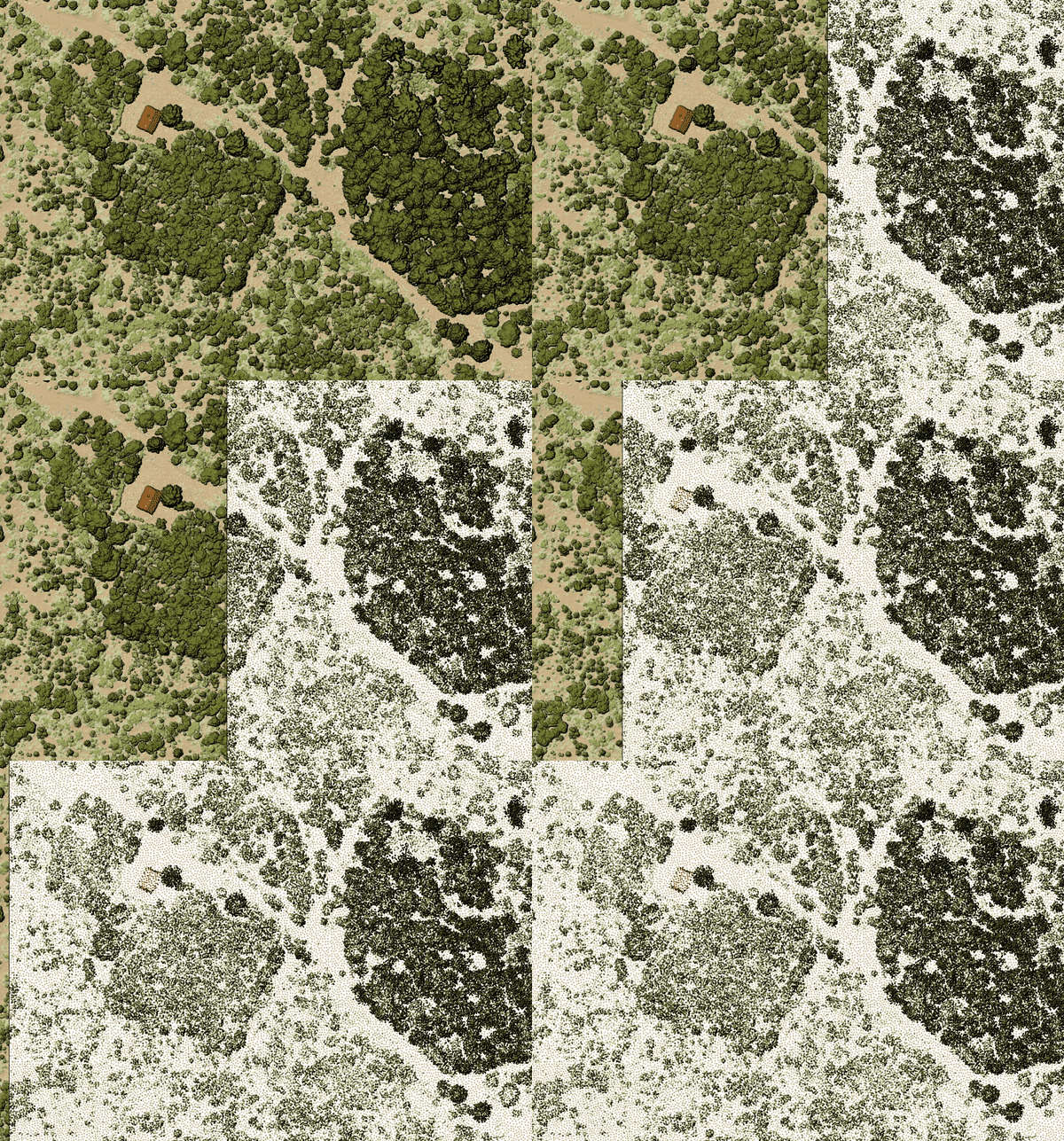
Fig. 24.46 Thining point cloud (by sampling radius)
See also
Parameters
Basic parameters
Label |
Name |
Type |
Description |
|---|---|---|---|
Input layer |
|
[point cloud] |
Input point cloud layer to create a thinned version from |
Sampling radius (in map units) |
|
[numeric: double] Default: 1.0 |
Distance within which points are sampled to a unique point |
Thinned (by radius) |
|
[point cloud] Default: |
Specify the output point cloud with reduced points. One of:
|
Advanced parameters
Label |
Name |
Type |
Description |
|---|---|---|---|
Filter expression Optional |
|
[expression] |
A PDAL expression for selecting a subset of features in the point cloud data |
Cropping extent Optional |
|
[extent] |
A map extent for selecting a subset of features in the point cloud data Available methods are:
|
VPC Output Format
|
|
[enumeration] Default: 0 |
Specify the underlying format in which data are stored
for Virtual Point Cloud (
LAZ/LAS may be faster to process, however they only allow rendering of the point cloud extents. |
Outputs
Label |
Name |
Type |
Description |
|---|---|---|---|
Thinned (by radius) |
|
[point cloud] |
Output point cloud layer with reduced points. |
Python code
Algorithm ID: pdal:thinbyradius
import processing
processing.run("algorithm_id", {parameter_dictionary})
The algorithm id is displayed when you hover over the algorithm in the Processing Toolbox. The parameter dictionary provides the parameter NAMEs and values. See Using processing algorithms from the console for details on how to run processing algorithms from the Python console.
24.1.16.16. Thin (by skipping points)
Added in 3.32
Creates a thinned version of the point cloud by keeping only every N-th point (reduces the number of points by skipping nearby points).
See also
Parameters
Basic parameters
Label |
Name |
Type |
Description |
|---|---|---|---|
Input layer |
|
[point cloud] |
Input point cloud layer to create a thinned version from |
Number of points to skip |
|
[numeric: integer] Default: 1 |
Keep only every N-th point in the input layer |
Thinned (by decimation) |
|
[point cloud] Default: |
Specify the output point cloud with reduced points. One of:
|
Advanced parameters
Label |
Name |
Type |
Description |
|---|---|---|---|
Filter expression Optional |
|
[expression] |
A PDAL expression for selecting a subset of features in the point cloud data |
Cropping extent Optional |
|
[extent] |
A map extent for selecting a subset of features in the point cloud data Available methods are:
|
VPC Output Format
|
|
[enumeration] Default: 0 |
Specify the underlying format in which data are stored
for Virtual Point Cloud (
LAZ/LAS may be faster to process, however they only allow rendering of the point cloud extents. |
Outputs
Label |
Name |
Type |
Description |
|---|---|---|---|
Thinned (by decimation) |
|
[point cloud] |
Output point cloud layer with reduced points. |
Python code
Algorithm ID: pdal:thinbydecimate
import processing
processing.run("algorithm_id", {parameter_dictionary})
The algorithm id is displayed when you hover over the algorithm in the Processing Toolbox. The parameter dictionary provides the parameter NAMEs and values. See Using processing algorithms from the console for details on how to run processing algorithms from the Python console.
24.1.16.17. Transform point cloud
Added in 4.0
Transforms point cloud coordinates using translation, rotation, and scaling operations using a 4x4 transformation matrix. Applies transformations in the following order: scaling, rotation (using Euler angles), then translation. Rotation angles are specified in degrees around the X, Y, and Z axes. All parameters are combined into a 4×4 transformation matrix that is passed to PDAL Wrench.
Parameters
Label |
Name |
Type |
Description |
|---|---|---|---|
Input layer |
|
[point cloud] |
Input point cloud layer to be transformed. |
X Translation |
|
[numeric: double] Default: 0 |
Translation distance along X axis. |
Y Translation |
|
[numeric: double] Default: 0 |
Translation distance along Y axis. |
Z Translation |
|
[numeric: double] Default: 0 |
Translation distance along Z axis. |
X Scale |
|
[numeric: double] Default: 1.0 |
Scaling factor along X axis. |
Y Scale |
|
[numeric: double] Default: 1.0 |
Scaling factor along Y axis. |
Z Scale |
|
[numeric: double] Default: 1.0 |
Scaling factor along Z axis. |
X Rotation |
|
[numeric: double] Default: 0 |
Rotation angle around X axis. |
Y Rotation |
|
[numeric: double] Default: 0 |
Rotation angle around Y axis. |
Z Rotation |
|
[numeric: double] Default: 0 |
Rotation angle around Z axis. |
Transformed |
|
[point cloud] Default: |
Specify the point cloud file to export the transformed point cloud to. One of:
|
Advanced parameters
Label |
Name |
Type |
Description |
|---|---|---|---|
VPC Output Format |
|
[enumeration] Default: 0 |
Specify the underlying format in which data are stored
for Virtual Point Cloud (
LAZ/LAS may be faster to process, however they only allow rendering of the point cloud extents. |
Outputs
Label |
Name |
Type |
Description |
|---|---|---|---|
Transformed |
|
[point cloud] |
Output point cloud layer containing transformed point cloud. |
Python code
Algorithm ID: pdal:transformpointcloud
import processing
processing.run("algorithm_id", {parameter_dictionary})
The algorithm id is displayed when you hover over the algorithm in the Processing Toolbox. The parameter dictionary provides the parameter NAMEs and values. See Using processing algorithms from the console for details on how to run processing algorithms from the Python console.