Wichtig
Übersetzen ist eine Gemeinschaftsleistung Sie können mitmachen. Diese Seite ist aktuell zu 50.00% übersetzt.
18.13. HTML-Ausgaben
Bemerkung
In dieser Lektion lernen wir, wie QGIS mit Ausgaben im HTML Format umgeht, die zur Produktion von Textausgaben und Grafiken verwendet wird.
All the outputs we have produced so far were layers (whether raster or vector). However, some algorithms generate outputs in the form of text and graphics. All this outputs are wrapped in HTML files and displayed in the so–called Results viewer, which is another element of the processing framework.
Sehen wir uns einige dieser Algorithmen an, um zu verstehen wie sie arbeiten.
Open the project with the data to be used in this lesson and then open the Basic statistics for fields algorithm.
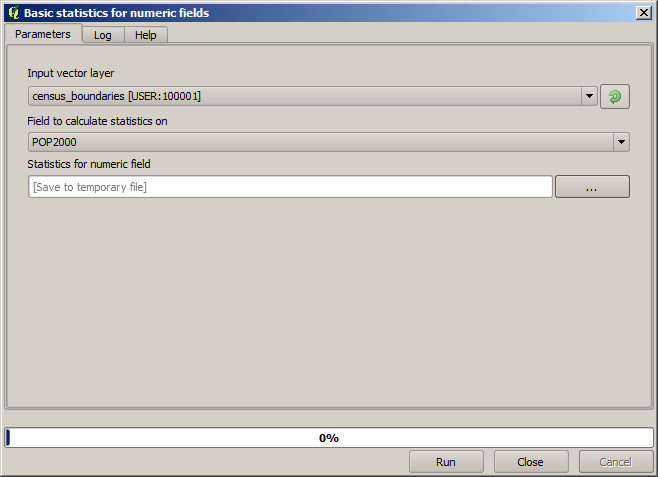
Der Algorithmus ist relativ einfach, man muss nur den zu verwendenden Layer und ein Feld (ein numerisches) auswählen. Die Ausgabe hat den Typ HTML aber die zugehörige Box arbeitet auf dieselbe Art wie bei der Ausgabe von Vektor- oder Rasterlayern. Sie können einen Dateipfad eingeben oder das Feld freilassen, um in eine temporäre Datei zu speichern. In diesem Fall sind nur die Dateierweiterungen html und htm erlaubt, so dass man das Ausgabeformat nicht ändern kann.
Run the algorithm selecting the only layer in the project as input, and
the POP2000 field, and a new dialog like the one shown next will appear
once the algorithm is executed and the parameters dialog is closed.
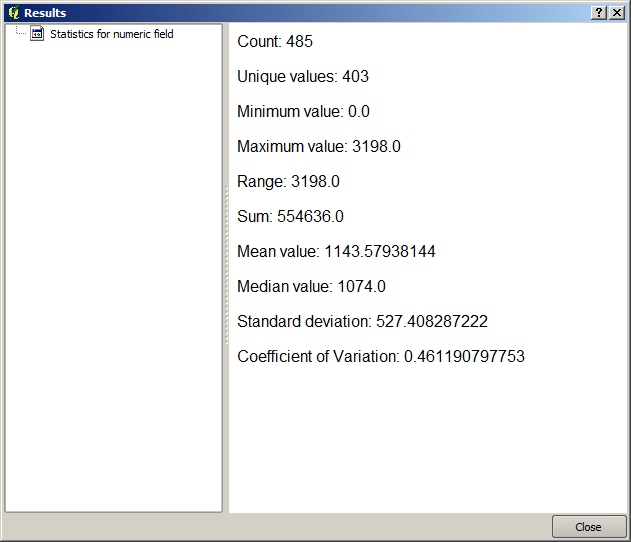
This is the Results viewer. It keeps all the HTML result generated during the current session, easily accessible, so you can check them quickly whenever you need it. As it happens with layers, if you have saved the output to a temporary file, it will be deleted once you close QGIS. If you have saved to a non-temporary path, the file will remain, but it will not appear in the Results viewer the next time you open QGIS.
Some algorithms generate text that cannot be divided into other more detailed outputs. That is the case if, for instance, the algorithm captures the text output from an external process. In other cases, the output is presented as text, but internally is divided into several smaller outputs, usually in the form of numeric values. The algorithm that we have just executed is one of them. Each one of those values is handled as a single output, and stored in a variable. This has no importance at all now, but once we move to the model designer, you will see that it will allow us to use those values as numeric inputs for other algorithms.